Diberdayakan oleh Blogger.
Tampilkan postingan dengan label updated. Tampilkan semua postingan

Jumat, 02 Mei 2014

lg rumor 2 in Sprint UA profile, QHD displayappears again (Updated)

lg g2 drop test aa 09
Update:
Sprint has made a few revisions to its User Agent profile listing for the LG-LS990 (LG G3). Fortunately the QHD display remains, instead the alterations affect the device’s RAM and camera specifications.
The handset’s RAM has dropped back down to 2GB from 3GB, putting it back inline with the LG G2. On the plus side, the camera modules have received a bump in resolution. The profile now lists the device as having a 16 megapixel rear camera, and the front facing sensor has also received a slight boost to 2.4 megapixels. We’ll have to wait and see what other changes this brings compared with the G2′s camera.
Finally, the software number has changed to “LS990ZV1″ but the profile still states that the device comes with Android 4.4.2, so the update is most likely making adjustments to LG’s specific features.
Original Article:
Back in mid-March a user agent profile from LG’s own website suggested that the upcoming LG G3 would come with a QHD (1440×2560) pixel resolution display. In fact, we’ve been hearing similar rumors since the beginning of the year. These details have been spotted once again, this time in a user agent profile from US carrier Sprint. As well as hinting yet again at a QHD display, the profile contains virtually an entire hardware spec sheet for LG’s next flagship smartphone.
The device in question is listed as the LG-LS990, which is expected to be the Sprint version of the LG G3, whilst the carrier-less version retains the D850 tag that we have seen before. If the QHD displays turns out to be correct, it’s likely that LG will be using the 5.5 inch QHD display that it already unveiled, which has a pixel density of 530ppi.
As well as display information, the UA suggests that the LG G3 will be sticking with a Qualcomm Snapdragon 800 processor, like the one found in the G2, rather than the slightly updated Snapdragon 801 chip found in other new flagship handsets. Sadly then, this spec suggests that the G3 won’t be one of the first smartphones to feature the upcoming Snapdragon 805 SoC. LG also seems to have brought the RAM count up to 3GB this time around.
Here’s the full spec according to Sprint’s LS990 UA Profile:
  • SoC: Qualcomm Snapdragon 800 MSM8974
  • CPU: Quad Core Krait 400 (probably clocked at the standard 2.3GHz)
  • Display resolution: QHD (1440×2560)
  • RAM: 3GB of RAM
  • Internal storage: 32GB
  • External storage: MicroSD cards up to 64GB
  • Rear-facing camera: 13MP (image resolution: 4160×3120)
  • Front-facing camera: 2.1M (video resolution: 1920×1080)
  • Operating system:  Android 4.4.2 KitKat
  • Cellular connectivity: LTE / EVDO / IS2000
  • Other connectivity: GPS, Wi-Fi, Bluetooth
Sources below.
Of course, this could always be a preliminary spec given to Sprint to help prepare its marketing material, LG may change one or two things before the official announcement. What do you make of the LG G3 based on these specs?

Jumat, 25 April 2014

How to root the Galaxy S5 – updated CF-Root method

If you keep an eye on XDA Developers you'd know that root for the Galaxy S5 appeared not long after the device was made available to the press courtesy of senior XDA Developer Chainfire. CF-Root is the ''easy root'' method for those new to the process and Chainfire has just updated the method to cover more S5 models. If you're looking to root your S5 and remove some of that Samsung bloatware, here's how to do it.

root samsung galaxy s5Rooting the Galaxy S5 is super easy thanks to Chainfire's CF-Auto-Root tool. / © AndroidPIT

Prerequisites

First up, you need to make sure you have a supported Galaxy S5 variant. The list is below. You'll also need Chainfire's CF-Auto-Root tool which will install SuperSU (binary and APK) and stock recovery on your S5. The zip file also includes Odin v3.07.

Note: rooting your device increases your flash counter and trips Knox's warranty flag, meaning you lose your warranty, so don't take this step lightly if you are not comfortable with this. This root method also disables Private mode, which Loie explained yesterday. Do not try this root method on any device other than the following:

SM-G900F (International Qualcomm)
SM-G900H (International Exynos)
SM-G900I (Oceania)
SM-G900M (Middle and South America)
SM-G900R4 (US Cellular)
SM-G900T (T-Mobile US)
SM-G900P (Sprint)
SM-G900T1 (Metro PCS)
SM-G900W8 (Canada)

As always, neither AndroidPIT, myself, Chainfire, the old gods or the new will accept any responsibility for any damage done to your device using the following process.

How to root Galaxy S5

1. Assuming your device model is in the list above (go to Settings > About Device Model Number) install the USB drivers for your device on your computer, download CF-Auto-Root.zip and extract it. You should see the following contents:

root s5 1When you extract the CF-Root zip file you should see the above contents (this is for the G900F). / © AndroidPIT

2. Open Odin (which is included in the zip), click on the PDA field and browse to the following file (from the zip file you extracted earlier): CF-Auto-Root-klte-kltexx-smg900f.tar.md5 (this is the file for the G900F, if you have a different model you will have a slightly different md5 file name). Do NOT check the re-partition box.

root s5This is Odin v3.07. You may have a newer version, but this is the version included in Chainfire's zip file. © AndroidPIT

3. On your device, boot into Download Mode. From a powered off state, press and hold Volume Down and the Home button and then press Power. You'll see a warning screen, from here just press Volume Up to enter Download Mode.

root samsung galaxy s5 2© AndroidPIT

4. Connect your S5 via USB cable and ensure Odin has recognized your phone is attached. Again, ensure repartition is NOT checked.

root samsung galaxy s5 4© AndroidPIT

5. Hit Start and wait for Odin to do its thing. Your S5 will restart and Odin will display a Pass message. You should now have SuperSU installed on your device. If not, you can simply install it from the Play Store. To confirm you now have root access on your S5, just use the classic Root Checker app. That's it. If you have any problems, head over to Chainfire's XDA thread for issues and solutions.

Have you rooted your Galaxy S5? What are your main reaosn for rooting?


View the Original article

Minggu, 20 April 2014

Updated: Micro $299 3D Printer Passes $2M On Kickstarter In 3 Days

Update: The consumer-focused, low-cost Micro 3D printer that’s currently raising money on Kickstarter to get its prototype to market, has pushed passed the $2 million mark in pledged crowdfunds — just three days after the campaign kicked off.

At the time of writing, the Micro is pushing north of $2.2M, with more than 7,850 backers pledging money to the project. In an update on the crowdfunding site, M3D said having so many backers means “the opportunity to make many more Micros”.

They also discuss the specter of delays — a common occurrence for crowdfunding projects seeking to turn a prototype into a consumer-grade, shipping product and deliver on backers’ expectations — but they add that they will be focused on ensuring the original schedule they set out for shipping the Micro does not slip.

“We planned for multiple levels of production and are ready to deliver your rewards on schedule. We know that some of you wonder if having more backers can affect your delivery dates, and rest assured more backers actually helps us hire more staff and get more Micros produced quickly and efficiently. As many of you have said, it is important to stick as close to the original design as possible to achieve this goal, and by doing this we can make sure there are no unnecessary delays,” M3D notes.

M3D’s timeframe for shipping the Micro is August 2014 for those paying top dollar for the device ($899+), or February 2015 for the cheapest pledge levels ($199+). The two least expensive pledge tiers for the Micro have all been snapped up, with the minimum spend to get a printer now $299.

The Micro passed $1 million raised on Kickstarter just 25 hours after kicking off its crowdfunding campaign.

Original story on M3D passing that crowdfunding milestone follows below.

Micro

The Micro, a low-cost 3D printer that’s targeting a mainstream consumer user, has blasted past $1 million in crowdfunding pledges on Kickstarter a day after launching its campaign.

The Micro maker’s original fundraising target — of $50,000 — was pledged in just 11 minutes.

According to Statista, the Micro is the fifth fastest Kickstarter project to-date to reach $1 million, managing it in 25 hours, just ahead of Pebble’s 27 hours but lagging Ouya’s 8.22 hours.

Statista

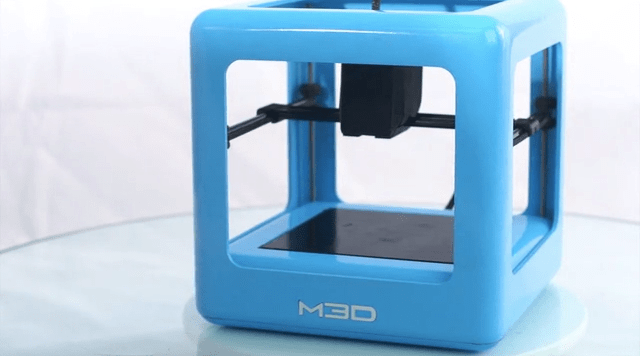
The small 7.3 in³ cube is being built by M3D, a team in Bethesda, MD. The printer has a print layer resolution of between 50 and 350 microns, and a print area of 4.6 x 4.2 x 4.4″.

M3D priced the first 250 pledges at $199, helping to drive early momentum to the campaign. The price has since risen to $299 but the pledges are still rolling in — and have taken the committed funds past the $1 million mark in the past few minutes.

Micro

The Micro does not offer sophisticated functionality. Which is exactly the point. It’s cheap and cheerful, comprising a bare-bones box that can hide the spool of filament in use in its base.

Calibration and leveling is built into the printer head so the user doesn’t have to bother themselves with such details.

The companion software being developed for the Micro likewise focuses on hiding complexity, with a drag and drop interface that’s being designed for touchscreen use.

But clearly the sweet-spot here is the price. At $199 the printer was a steal — and at that price point, as my TC colleague John Biggs noted, it was likely a loss leader.

At $299 the Micro’s makers should be getting a margin — and consumers are clearly getting a 3D printer at a price they like.

Or they will be, if M3D can deliver. But with $1M and counting in their Kickstarter coffers — and a full 28 days left on their campaign to run — they’re looking well placed to make good on their own pledges (which, since passing the original Kickstarter funding goal, include expanding their own team to get the Micro out to backers as soon as possible).

“We’ll… be growing the M3D team and operations base to deliver The Micro to you as early as possible,” they note.

Kamis, 17 April 2014

Microsoft OneNote updated, lets you create OneDrive notebooks and sections

onenote

Today Microsoft is bringing out a new update to its OneNote Android app, bringing the ability to create Notebooks directly on your OneDrive account from your Android devices.

Creating a notebook is extremely easy, as all you need to do is tap the overflow menu within the Notebooks list and then tap “create notebook”. Once the notebook is created, it’s equally easy to create and delete OneDrive Notebooks sections as well.

In addition to the notebook and section support, today’s update also brings several bug fixes and performance improvements. Although Microsoft doesn’t give a full list of what bugs it is addressing, we do know that it is solving some existing problems with pasting from the clipboard.

To get in on the latest version of OneNote, you’ll want to head on over to Google Play. Have you downloaded the latest version, if so, notice any other changes not mentioned in the change-log? In general, what do you think of OneNote versus Evernote and other similar note-taking apps? Let us know in the comments!

OnePlus One specs get updated: Snapdragon 801 2.5 GHz, 3 GB RAM

Kris Carlon

Kris Carlon

Putting down roots in Berlin after six years of traveling is a major step for Kris Carlon, who has spent more time living out of a tent lately than sitting at a desk. Kris comes to the AndroidPIT Editorial Team via a lengthy period spent writing on art and culture in Australia and other places he has lived. He joined the Android community while resurfacing in civilization back in 2010 and has never looked back, using technology to replace his actual presence in other people's lives ever since.

The OnePlus One is set to arrive on April 23 and the just updated specs are something to really look forward to: a quad-core Snapdragon 801 running at 2.5 GHz and 3 GB of RAM in support. The OnePlus One will ship with CyanogenMod, a 3,100 mAh battery and 5.5-inch 1,080p display, this thing is going to be a rocket ship! As OnePlus justifiably claim, this will be the fastest phone on the market.

OnePlus LogoI didn't think it was possible, but the OnePlus One just got even better. / © OnePlus

The Snapdragon chipset used in the OnePlus One is the 8974AC Snapdragon 801, which is clocked at 2.5 GHz rather than the 2.3 GHz we've seen in the Snapdragon 800. The Galaxy S5 also has the Snapdragon 801, but only 2 GB of RAM. The only other device shipping with the same CPU/RAM combo as the OnePlus One is the Oppo Find 7 which also ships with a 2K display. It'll be very interesting to see who claims the ''fastest'' title come April 23 as it'll all be down to optimization and OS.

The OnePlus One was originally going to ship with the Snapdragon 800, so we can only assume the jump to the 801 was to future-proof the OnePlus One against the next wave of flagships and keep up with the Oppo Find 7 which launched recently too. The OnePlus One will cost under 400 USD and also feature always-on voice recognition. If that price/specs combo doesn't make it interesting to you, nothing will.

Are you looking forward to the OnePlus one? What are your thoughts on smaller companies like Oppo and OnePlus outgunning the major OEMs on hardware specs this year?

Via: OnePlus (Twitter) Source: OnePlus


View the Original article

Selasa, 15 April 2014

Updated Pushbullet improves notifications, supports Tasker events

pushbullet-update-richer-desktop-notifications-support-tasker-events-0170

File- and notification-pushing Android app Pushbullet fired its big guns again as the app’s updated version now provides richer desktop notifications and Tasker event plugin support.

According to the Pushbullet blog, the full images of notifications on your Android device are now displayed on your desktop. This means that, with just one look, you can instantly know who sent an email or a text message.  A preview of the message is also shown in the notification.

pushbullet-update-richer-desktop-notifications-support-tasker-events-0172

The post also mentions that Pushbullet can now display the album art of a song currently playing on your Android device.

Improved power efficiency

Pushbullet forwards notifications from your Android device to your desktop through the app’s Notification Mirroring Service, which, according to the same blog post, has been optimized for performance and power consumption. The improvements will reportedly make the service run faster and use less memory, resulting in a more efficient battery use.

Tasker Events support

Pushbullet also now supports Tasker event plugins, a new feature as of Tasker version 4.3. Pushbullet already supported sending Pushbullet notifications through Tasker. The latest version of Pushbullet, however, added support for triggers. This means that you can push a notification from your desktop to phone, for example, and have Tasker react to that. This feature practically opens up many different possibilities for automating your Android device using both Tasker and Pushbullet.

pushbullet-update-richer-desktop-notifications-support-tasker-events-0174

And, while not many people will be as eager to play around with a Pushbullet+Tasker toy, most people will find Pushbullet’s core functions still useful for “pushing” notes, files, images, URLs, addresses, and others to your desktop from your phone — or vice versa — plus the convenience of not having to pick up your Android device just to know why it’s beeping or ringing.

Do you use Pushbullet? Or do you prefer other file-sharing Android apps or remote desktop apps? What do you use Pushbullet for? Have you tried using Tasker with Pushbullet — and for what purpose? Let us know in the comments.

Chrome OS updated with on-screen keyboard – is a Chrome OS tablet coming?

Chromebook-Pixel-aa

Amid speculation of an incoming Chrome OS tablet, Google updated today its cloud-based operating system with an on-screen keyboard and several other features.

The stable channel of Chrome OS was updated to version 34.0.1847.118, which brings bug fixes, performance improvements, and a few interesting new features. Among the highlights of the update, Google’s Chrome team mentions:

  • The ability to dock windows or panels to the sides of the screen;
  • Offline Google Drive backup will be enabled automatically for all users after first login;
  • The addition of an on-screen keyboard;
  • Sticky keys, which allows users to perform keyboard shortcuts by pressing one key at the time, instead of simultaneously.

The addition of the on-screen keyboard has been long in coming, with the first clues of the feature being spotted in development channels more than a year ago. So, while its arrival is no surprise, it seems a bit odd that Google would bother to add an on-screen keyboard in Chrome OS for use with a touchpad or a mouse. More likely, Google is prepping Chrome OS for the arrival of touch-enabled Chromebooks or, possibly, of a Chrome OS-powered tablet.

That leads us to a report from ZDNet that mentions an Acer event scheduled for late April that could see the introduction of the first ever Chrome OS tablet. The argument is the tagline of the event invitation, which reads “A touch more connected.”

Is Acer teasing a Chrome OS tablet? It’s hard to tell for sure, but ZDNet’s reasoning makes sense. One of the biggest Chromebook makers, Acer is one of the two OEMs that Google chose to launch the concept back in 2011, along with Samsung. While not very successful in the tablet business, Acer has the expertise to create a competitive Chrome OS tablet, and, because its Android tablets are lagging, the incentive to try new things.

But then again, Acer could simply be referring to a touchscreen-equipped Chromebook or something unrelated.

One thing is sure for now – Google is building up Chrome OS for touch devices, and it’s only a matter of time before the first such device hits the market. Several other touch-oriented features spotted in the Chrome OS source support this theory.

Whether this class of devices will be successful or not is an entirely different discussion. The biggest question is – why would you pick a Chrome tablet over an Android one?

Jumat, 11 April 2014

Swiftkey gets updated, adds Google+ and Evernote personalization

swiftkey-updated

Swiftkey for Android is one of the more popular 3rd party keyboards out there, in large part thanks to its excellent predictive capabilities. Now a good thing is getting even better, as a new update has arrived.

The biggest change in the update is the introduction of new personalization options that allow the app to collect typographical data from Google+ public posts and from Evernote. The idea is that collecting this information should make the keyboard predictions and suggestions even more accurate. If these features sound familiar, that’s because they’ve been available for Beta users for a little while now.

For those not keen on sharing more information with SwiftKey than you have to, it’s important to note that these features are opt-in and not forced upon you. In addition to the personalization changes, the update also brings bug fixes that should resolve forced closes and other crashing issues experienced by some Swiftkey users.

To grab the latest version of SwiftKey, you’ll want to head on over to Google Play.

Rabu, 26 Maret 2014

T-Mobile posts a little Galaxy S5 unboxing video, pre-order page now live (updated)

Samsung Galaxy S5 hands on color size vs all -1160823

UPDATE: As expected, T-Mobile’s pre-order page is now live. You can grab the Galaxy S5 for $0 down and $27.50 a month. Those interested in buying it outright will pay $660.

Starting today, T-Mobile will be taking your pre-orders for the new Samsung Galaxy S5. Those that pre-order are expected to receive the actual phone in hand on April 11th. Ahead of this, a lucky T-Mobile employee has gone ahead and recorded a little Galaxy S5 unboxing video for all of us to enjoy now.

The official T-Mobile video, put together by their product guru Des Smith, provides a quick glance at the phone and packaging. The Galaxy S5 is a 5.1-inch device with an octa-core processor, 2GB of RAM, 16GB or 32GB storage and Samsung’s new 16MP ISOCELL camera capable of recording 4K video. We took the phone for a quick spin at its official announcement back in February, check out all the specs and our impressions here.

Of interest in the video is the multiple references to the seal on the back cover of the device. This seal is key to the Galaxy S5′s IP67 dust and water resistance rating, which means it is effectively waterproof for short and shallow dunks. For me, the interesting part is the reminder to check your device’s back cover, as seen when it first boots into the Home screen.

Pre-ordering your T-Mobile Galaxy S5 from now until the end of the month will get you the device for $0 down, then pay it off in the next 24 months at $27.50 per month, for a total of $660. T-Mobile calls this a special introductory price, so expect a little price bump come April 1.

If you are not a fan of T-Mobile, but the Galaxy S5 is your must have device, head on over to AT&T or Sprint to pre-order for $200 with a 2 year contract, or U.S. Cellular for $200 after mail-in rebate. RadioShack will also give you special pre-order pricing, which means there really are no shortages of places to make sure you are one of the first to get the Galaxy S5 in hand next month.

Have you pre-ordered your Galaxy S5, or would you prefer to hold one before you commit?

Like this post? Share it!

Spotify updated, adds follow features and a few other changes

Spotify

A new update has arrived for Spotify, bringing several new features with it. Probably the biggest change is the ability to follow people directly from your profile. According to the change-log you can simply tap the friends icon to find people you know and discover what kinds of tunes they listen to.

In addition to the ‘follow’ changes for the Android app, there are also a few other minor changes listed in the change-log including the ability to long press to delete previously played stations in Radio mode, and new “pretty images” in the playlists. While not specifically mentioned, we imagine that there are also at least a few unspecified bug fixes.

As you can see, this might not be a major update, but there are still a few welcome changes. Now if Spotify would just get its act together and introduce Chromecast support, but I digress. To grab the latest app update you’ll want to head on over to Google Play.

Like this post? Share it!

Kamis, 20 Maret 2014

Motorola Assist and Motorola Camera updated, bug fixes and a few other changes

motorola-assist

Motorola is introducing new updates to two of its apps, Motorola Assist and Motorola Camera.

For Motorola Assist, the big change here is that you can now choose which calendar you wish for the app to monitor, which is very handy for those folks that keep multiple calendars such as one for work and one for personal.

Once you choose which calendar you want to link with Assist, the app will then monitor the calendar and automatically mute itself during scheduled meetings (just like before). Motorola also notes that there are several bug fixes in the update.

As for the Motorola Camera? In addition to bug fixes, Motorola is now adding the ability to take pictures on your phone by hitting the volume key on your phone or Bluetooth headset. A minor change, but still useful for those that like the idea of pushing a physical button for taking a picture.

To grab the Motorola camera update for Google Play, you’ll want to click here. The Motorola Assist update is also available now on Google Play.

Like this post? Share it!