Diberdayakan oleh Blogger.
Tampilkan postingan dengan label Smartphone. Tampilkan semua postingan

Minggu, 11 Mei 2014

new smartphone launch Motorola will unveil

motorolamwc
It’s been a little while since Motorola brought us anything new, other than the announcement of its upcoming Moto 360 smartwatch. While there’s still a lot of unknowns for Motorola as its prepares to transition to a new owner, it appears that we’ll be getting a look at what’s next from the company on May 13th.
The news of the upcoming announcement comes straight from Motorola’s press invite (seen below), and hints that their next handset will be “Made to last. Priced for all.” The announcement event will take place in London during the morning hours. So what kind of device are we looking at here? That’s a good question.
motorola-may-13
The Moto X — Motorola’s main flagship — was released back in August, so it seems less likely that the event will center around the Moto X+1. On the other hand, maybe the company wants to get the device out into the hands of consumers before Google’s deal with Lenovo finalizes later this year.
Judging by the wording of the press invite, however, it seems much more plausible that we are looking at Motorola’s ultra-low-cost XT1021, which reportedly will go by the name of Moto E (E for Everyone?). Although we don’t know for sure what to expect from the Moto E (aka XT1021), previous rumors indicate the device will offer a 1.2GHz dual-core CPU, 1GB RAM. 5MP camera, a 4.3-inch display, 4GB storage, a 1900 mAh battery and Android 4.4 KitKat.
Motorola's next device could be cheaper than even the highly-affordable Moto G
Even more impressive, the device is said to be much cheaper than even the highly-affordable Moto G. With the Moto G coming in at $179 unlocked and as little as $99 for locked prepaid variants, this means we could be talking about a handset that’s under $100, unlocked and without contract.
For now we’d take all the rumors with a grain of salt, but thankfully we don’t have much longer to wait before we find out for sure what Motorola has up its sleeve.
If Motorola really is preparing to unveil a device that’s priced lower than the Moto G, this could be a huge deal, especially for budget users and those in emerging markets. Interestingly enough, Lenovo has hinted that emerging markets will be a priority for Motorola once the company becomes part of its team.

Senin, 28 April 2014

Is Google working on a sub-$100 Nexus smartphone?

nexus devices line

The rumor mill is piping up this afternoon with word of a possible sub-$100 Nexus device. There are no specifications to speak of just yet, but unnamed sources and rampant speculation lead to the idea of a low-mid range phone with a MediaTek chipset, 1GB of RAM and 2G/3G connectivity.

The rumored Nexus device is not expected to be Google’s next flagship smartphone, that has been reserved for what is dubbed the Nexus 6 which is speculated to be built by LG. It is not in Google’s typical naming scheme, but this new sub-$100 phone is starting to feel like what other manufacturers call a ‘mini’ version – Nexus 6 Mini, perhaps? As for the pricing, we’re already seeing Lenovo launch their A-series tablets for a little over $100 equipped with MediaTek chipsets, speaking to how the chipmaker could have Qualcomm and others worried.

Is it inexpensive, or just cheap?

This is a valid concern for Android device shoppers. We have seen more than a few cheap Android tablets creep onto the market in the last couple years. However, some prominent device makers have also created exceptional equipment at affordable pricing. Take the Moto G for example, the Moto G is a sub-$200 phone that was released this past December. It is a solid device that also packs 1GB of RAM and does not have a 4G radio, we’ve taken the Moto G for a full review, read all about it here, and checkout the video below.

Looking a little higher end than the Moto G, set to be officially announced in the next week, the OnePlus One is looking to possibly hit the market as the most powerful smartphone to date. The young company lives by the motto “never settle,” and is expected to have their ‘flagship killer’ smartphone launch for as little as half the price of the Samsung Galaxy S5. Google themselves have already shaken the 7-inch range tablet market, launching the Nexus 7 tablet back in 2012, with a redux in 2013. Built by ASUS, the Nexus 7 still feels very much like a premium device, but it too sells in the $200 price range.

We’ll compare the Moto G with pricier phones, because its price tag casts a new light on all of its features. - Joshua Vergara, Android Authority

motorola moto g (3)These devices have set in motion a trend and a realization for smartphone manufacturers, there is a huge global market for quality, yet affordable equipment. Motorola is rumored to be bringing a new low-cost smartphone to Mexico – called the Moto E, the rumor has it as a very similar unit to the Moto G, capitalizing on a phone model that has already been a top seller for the company.

Is there a market for a sub-$100 Nexus device?

A sub-$100 Nexus device is an intriguing prospect. On the one hand, we hold the idea that Nexus devices are for those that are in the know when it comes to Android – specifically built for developers to have access to all of the OS features and hardware sensors that Google has put into their pure Android. On the other hand, Nexus devices have proven to be excellent phones at an affordable price. The Nexus 5 has been a favorite for many, starting at $350, it has been the best answer for many new-to-Android users that ask “what phone should I get?” Check out our review of the Nexus 5 to see why.

The success of a sub-$100 Nexus device may come down to two main factors. First, who is Google building this device for? If the phone is built as an extremely affordable developers test phone, normal consumers may be put off by a lack of features, such as external SD card support. Second, in one word, marketing. The Nexus 5 may be made to capture the moments that matter, but I have never met it in any ads outside of Google’s own websites, or seen people dancing with it to Michael Jackson. Whether Google’s purpose is to make a number one selling phone or not, a sub-$100 phone removes the barrier to entry to the Android ecosystem, which may prove crucial to gaining new users, especially in emerging markets around the globe.

We look forward to learning more about this sub-$100 Nexus device. Until then, what are your thoughts on a Nexus branded sub-$100 phone – will Google make a knockout product for an amazing price, or just a decent entry level unit that anyone can afford?

Samsung to release Tizen smartphone in June

Sterling Keys

Sterling Keys

After finishing his Bachelor of Commerce degree at the University of Alberta, Sterling made the move to Vancouver Island in British Columbia. Within a stone's throw of mountains, ocean, and complete wilderness, he mountain bikes and skis during the day and is hopelessly connected to his phone and computer at all other times. His writing "career" started as he penned about his escapades while skiing and has slowly progressed to freelance marketing and promotion throughout British Columbia. Interested in anything tech and gadget related, he has thoroughly enjoyed his transition of writing for AndroidPIT.

Samsung has told Reuters that the first smartphone based on their Tizen operating system will be launched at the end of the second quarter. The device itself is expected to be on the higher-end of things, bringing it into play with their own Samsung Galaxy S5 and top of the line devices from other manufacturers. A midrange device is expected to be announced to be released at a later date.

Tizen samsung demoTizen is about to be released out into the wild. / © AndroidPIT

Samsung has high hopes for their Tizen operating system: they are one of the biggest names when it comes to mobile devices and this move will allow them to start pushing away from their dependency on Google when it comes to updates and firmware maintenance.

While Samsung most likely won’t completely abandon Google and Android with this release, it does give them a bit more wiggling room in what they can and can’t do with the operating system. In an interview with Reuters, the senior vice president of Samsung, Hankill Yoon, said that TIzen will be considered a success if it can be responsible for 15% of Samsung smartphone sales.

tizen logoWhile not expected to replace Android all-together, Samsung hopes to make a big bang with their own Tizen OS. / © http://www.sammobile.com

While we know very little about the exact details of the smartphone release of Tizen, you will be able to get your hands on one of their new Galaxy Gear smart watches that are running a version of Tizen before the end of the month. While it won’t give the same user experience as Tizen running on a smartphone, it should give users an insight into the design choices that will be made with Tizen.

What do you think about the latest news on the Tizen operating system? Would you be willing to give it a try in a higher-end smartphone?

Source: Reuters


View the Original article

Sabtu, 26 April 2014

This Week On The TC Gadgets Podcast: Siri Hack, Amazon Smartphone, And Galaxy Gear

Siri was hacked! But don’t panic — it’s apparently a really fun hack that gives Siri access to your other apps. Meanwhile, rumors are swirling over Amazon’s forthcoming smartphone with 3D-gesture features. Plus, we’re taking a good hard look at the Galaxy Gear smart watch equipment from Samsung. Or, more accurately, we diverge into talking about the Galaxy S5.

Also, it’s Good Friday.

We discuss all this and more on this week’s episode of the TC Gadgets Podcast featuring John Biggs, Matt Burns, Jordan Crook, and Darrell Etherington.

We invite you to enjoy our weekly podcasts every Friday at 3 p.m. Eastern and noon Pacific. And feel free to check out the TechCrunch Gadgets Flipboard magazine right here.

Click here to download an MP3 of this show.
You can subscribe to the show via RSS.
Subscribe in iTunes

Intro Music by Mendhoan.

Canary Smart Home Security Shows Off Its Smartphone App For The First Time

Canary has had a big year. After smashing through its Indiegogo campaign goal and picking up an extra $10 million in VC funding, the company is nearly ready to ship its home security product.

Due to a couple of hurdles, Canary units won’t arrive until “this summer,” but to tide us over, the team has given us our first real look at the complementary smartphone application.

So, when you first receive your Canary, you must pair it to your Wi-Fi and your smartphone. Rather than go through some painful process, the company set it up so that you can pair the unit with the smartphone and connect the Canary to the Internet by simply using a standard audio cord, which is included with the device.

Once you’re paired, you create a user ID and password and you’re essentially done. From there, the Canary will give you constant access to a live video feed of your home, as well as reads on temperature, air quality, noise, etc. But you can have even more control.

Canary lets you sync up to four different units in a single location to get a clear view of every room in the house. You can also set up multiple Canary units in different locations to keep a lookout on your house and your office, for example.

For each location, the user can assign contacts as either primary or backups. Primary users (most likely family members of roommates) have complete access to the Canary system at any time, and get notifications if anything is awry. Backups are usually neighbors or close friends who will not have anytime access to the live video, but will be next in line if you don’t respond to a notification. That way, friends and neighbors can rescue your cat if there’s a fire while you’re at work, or call the cops if someone is breaking in and you don’t respond to your notifications.

The app also has different modes: “Home”, “Away”, “Privacy” (which stops recording and monitoring) and “Vacation.” Canary already knows when you’re home and away, and you have complete control over the vacation and privacy modes.

Perhaps the most interesting part of the Canary app is the ability to flag events. I asked the founders why anyone would need to save recorded clips of “motion events” on their smartphones, as it seems you would either act on them or not need them anymore. However, Canary realizes that not every event has to be a bad one.

Maybe Canary picks up your kid’s first steps, or catches a special moment in your life and you want to hold on to that. By flagging the event in the Canary app, that moment is saved and can be downloaded to your computer.

Canary doesn’t ship until this summer, but the team is still taking pre-orders here.

  1. Photo Apr 18, 12 50 11 PM

  2. unnamed

  3. unnamed (1)

  4. Photo Apr 18, 1 07 29 PM

  5. Photo Apr 18, 12 59 16 PM

  6. Photo Apr 18, 12 59 41 PM

Kamis, 24 April 2014

Build a Smartphone Connected Garage Door Opener with an Arduino

Build a Smartphone Connected Garage Door Opener with an Arduino

Garage door openers are simple enough when it's just a button, but if you want something more high tech, Instructables user MegunoLink shows off how to build a garage door opener you can control with your smartphone.

MegunoLink's build uses a network capable Arduino, a relay board, a few cables and wires, and a power supply. From there, you'll just compile the code onto the Arduino and you can then access your garage door from anywhere. The end result is a pretty straightforward system where you'll enter a password into your phone that opens the garage door. Head over to Instructables for the full guide.

Arduino WiFi Garage Door Opener | Instructables


View the Original article

Rabu, 23 April 2014

Take Awesome Astronomy Photos with a Smartphone and a Telescope

Take Awesome Astronomy Photos with a Smartphone and a Telescope

If you're eager to start photographing the night sky, but you want to do so on a budget, it can be done—even with just a smartphone and a telescope.

First of all, you'll need a telescope. You get a very reasonable starting telescope on eBay now, for as little as $50. Feel free to spend more if you wish, but bear in mind you'll need to buy eyepieces too.

You also need camera, but the one on your smartphone will probably work. All smartphone cameras are good enough, if not great these days. I've personally used the Lumia 925 and 1020, iPhone 5, and Nokia N8.

Take Awesome Astronomy Photos with a Smartphone and a Telescope

That's all you really need, but it can be tough to get a photo from the telescope's eyepiece by hand. It's doable, but extremely tricky. A better way is to buy a clamp specifically for attaching phones to a telescope. Yes, that's a thing! I like the Orion Steadypix Universal (shown above). It's completely universal and so can fit a wide range of devices.

It obviously won't be winning you any awards in National Geographic, but you can get some pretty cool shots, and it's a fun little weekend project.


View the Original article

Senin, 21 April 2014

Smartphone users are unwitting participants to widespread surveillance effort, says security expert

Crowd using mobile phones

The ubiquity of mobile devices has prompted government agencies to piggyback on corporate efforts to collect our information all in the name of marketing, says security expert Bruce Schneier.

Depending on which study you reference, smartphone penetration in the US reportedly ranges from 62 percent to 71 percent, according to analytics firms like comScore and NPD. Regardless of the actual figures, one thing is for sure: smartphones, tablets and wearable devices like smartwatches and smart glasses are gaining ground among consumers.

The convenient fact is that these devices offer an unprecedented level of connectedness among users, that we are plugged into the cloud almost our entire lives — at home, at work, at play, and on the move. With applications like Gmail, Facebook, Twitter and other services, we can keep connected with each other, collaborate, share content, gain access to information and much more.

Surveillance: the business model of the Internet

In many cases, these are offered for free. And there’s the saying that if something is given for free, then you’re the product. This is the sentiment of security researcher and author Bruce Schneier, who gave a keynote at the SOURCE Boston Conference earlier this week.

“Surveillance is the business model of the Internet,” said Schneier in his Keynote, adding that the Internet today is built on an ecosystem of spying. Information is the most valuable currency in this scenario. “We build systems that spy on people in exchange for services. Corporations call it marketing.”

Schneier says the data economy is not really bad in itself. However, it has become an amplifier of human intent and activity. For example, political dissidents have used social media services like Facebook to converge and act on their collective will. However, governments are also using the same media to enforce their own agenda. According to Schneier, governments are already powerful in the first place, but their power is magnified by technology.

At a most fundamental model, we are tenant farming for companies like Google. We are on their land producing data.

Because of advantages in data architecture and infrastructure, service providers can now afford to offer almost-unlimited storage for free. Gmail users no longer have to delete messages to make way for new ones — we just use search to sift through years’ worth of emails to find the right information. The same goes with other content, like photos, IM conversations, social media comments and the like. This vast ocean of information is now being mined by corporations, all with the intent of profiting from the marketing capabilities that targeted messaging can offer.

Corporations do the spying for government, sometimes unwittingly

The result is that we have become the metadata that we generate, says Schneier. It’s not so much about the content of our conversations and information sharing, but rather whom we share these with. “I like to think of this as a feudal model,” Schneier quips. “At a most fundamental model, we are tenant farming for companies like Google. We are on their land producing data.”

Im watching you NSA

The interesting part here, says Schneier, is that governments have started piggybacking on the efforts of corporations to track our data. “The NSA woke up and said ‘Corporations are spying on the Internet, let’s get ourselves a copy,’” he says.

The cost of technology has been drastically lowered, especially since we mobile users are buying into the whole thing by subscribing to cellular service, sending SMS and IM messages, connecting to WiFi hotspots, exchanging emails, and sharing on social media. Schneier even said surveillance is no longer just “follow that car” — in reference to how the stereotypical spy or detective does surveillance and tailing. Rather, with metadata and tracking, it’s now “tell me everywhere the car has been for the past month.”

If surveillance previously involved several people actively following just one person, now individual intelligence agents can keep track of thousands. Interestingly, with the recent disclosure that even our supposedly secure SSL connections are not free from eavesdropping with the “Heartbleed” bug, we are likely to have been targets of government spying and surveillance for some time now.

But perhaps as mobile and Internet users, we’re already aware of the likelihood that we’re being tracked. The question is this: what do we do about it? “I think this is the issue by which we will be judged when our grandchildren read the history of the early days of the Internet,” concludes Schneier.

Featured image credit: Bikeriderlondon /Shutterstock

Jumat, 18 April 2014

Google Releases First Developer Resources For Project Ara, Its Modular Smartphone

Google’s Advanced Technology and Projects (ATAP) group has released a Module Developers Kit (MDK) for Project Ara, its forthcoming modular smartphone, providing reference implementations for various design features.

The ATAP describes Ara as follows:

The Ara platform consists of an on-device packet-switched data network based on the MIPI UniPro protocol stack, a flexible power bus, and an elegant industrial design that mechanically unites the modules with an endoskeleton.

The MDK goes on to note that the success of the modular smartphone concept is dependent on the development of a rich ecosystem of modular blocks that users can pick and choose from:

Ara’s success is predicated on a rich, vibrant, and diverse ecosystem of modules from a myriad of developers. Users would be able to select modules from an online marketplace using a confgurator that facilitates user choice and curates the confguration process to ensure that the selection of modules provides the expected system-level functionality.

The MDK also details how Google is considering a discrete set of configurations for parcelling off different sized endos — aka the metal endoskeletons into which the various modular blocks are ultimately slotted.

While the front of these endos supports relatively few options for user configuration (as seen below), owing to the real-estate requirements of the screen, the rear of the different-sized devices allows for multiple modules to be combined in multiple ways.

Ara

Ara

But Google is evidently still determining which of the possible rear endo design configurations it will make available. “While Google may or may not make every possible endo variant available, developers should be mindful that modules should support every variant,” the MDK notes.

The 81-page MDK discusses the “pebble-like form expressed by the Ara module design language”, and goes into specific detail of how modules should be designed — requiring they have a rectilinear footprint, a 1.5mm corner curvature, and that their base must be a single piece of machined 6061 aluminum to ensure a snug fit.

The document also touches on modules that might extend beyond the “standard envelope” in order to support specific additional functionality, such as a thermal imager module with a protruding lens, or the Pulse Oximeter Module, pictured below, for measuring blood oxygen saturation:

Project Ara MDK

Regarding the electro-permanent magnets (EPM) which will be used to keep rear Ara modules in place, the document notes that the EPM has “two selectable states: the attach state and release state, corresponding to high and low levels of magnetic force”, with electrical power required only to switch between the states, not sustained to maintain either one.

Front modules, which don’t have so much endo to lean on, will use EPM and a ball-spring plunger assembly to ensure they remain in place.

Ara

On the apps front, the MDK notes that “in general” Android apps for Ara are not significantly different so “consequently, Ara devices are anticipated to be compatible with most standard apps”.

But it does add that “developers are encouraged to pay attention to application stability and graceful behavior in light of dynamically varying availability of hardware resources (as with hot-plug, for instance)”.

The Project Ara MDK can be downloaded via this link.

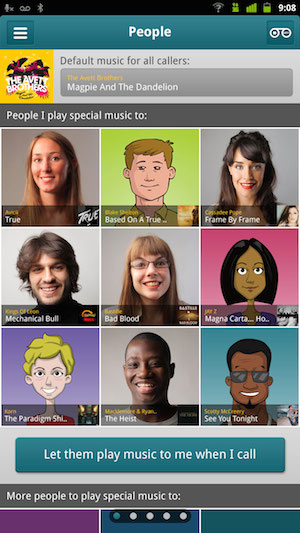
Listen Is RealNetworks’ New Smartphone App For Ringback Tones, And It’s Launching In The US

Remember ringback tones? You know, those songs and messages that you could customize to play so different people would hear different things when they called you? Well, RealNetworks aims to bring them to your smartphone.

The company launched an iOS and Android app called Listen in the United Kingdom last fall, and today it’s bringing the app to the United States. In the US, the app (which requires carrier integration to work) is initially limited to T-Mobile subscribers.

The idea might sound like a bit of a throwback. However, in a post from earlier this year, RealNetworks’ Ken Murphy said that in 2011, there were between 150 million and 200 million ringback tone subscribers in the world. And while he acknowledged that this is largely seen as a feature phone technology that’s not relevant on smartphones, Murphy argued that it represents “untapped potential”.

I spoke to Max Pellegrini, president of RealNetworks’ Mobile Entertainment division, about today’s app. He said that by launching in the UK first, the company was able to treat its initial market as “a testbed” before its bigger US launch.

“In terms of lessons learned, we are still in the early days, but we’ve definitely seen that engagement of consumers is significantly better than the traditional legacy services,” Pellegrini said, something he attributed to the app’s ease-of-use.

The RealNetworks team gave me a quick demo of Listen, and it did indeed look simple to assign different songs to different users (RealNetworks’ music catalog includes songs from Warner Music Group, Universal Music Group, and independent labels), to activate different status messages like “I’m working out”, and to set special holiday ringback tones (so that, for example, Christmas music plays when someone calls you on Christmas).

You can learn more about the Listen app here. There’s a free, basic version, and paid plans for additional features starting at $2.99 per month.

Selasa, 25 Maret 2014

Vaavud Raises $375K To Tame The Wind With Your Smartphone

A Kickstarter success has just closed its seed funding round, raising $375,000 to continue its work of measuring the wind using a network of smartphones with a low-cost, electronics-free hardware accessory combined with a mobile app. Danish startup Vaavud‘s new funding comes from a group of angel investors, and according to Vaavud CEO Thomas Helms, it’ll help them expand at a faster rate than before, and offer more product features to its hobbyist audience, as well as build out more services that appeal to business and enterprise.

The startup builds a tiny wind meter that consists of just a couple pieces of plastic that fit into your smartphone’s headphone jack. The accessory communicates with your phone via soundwaves, which are translated by Vaavud’s app into a windspeed measurement. Those measurements are then collected and analyzed by the app, providing the company with a comprehensive look at wind speed measurements around the world.

This seems like a bizarre use case for a smartphone, but Vaavud has already attracted interested corporate clients from the agriculture industry. A joint project with the Swedish agricultural coop Lantmännen Maskin AB will see the startup build a custom solution for measuring wind speed that’s designed to comply with new, tighter safety requirements in Sweden around the use of pesticides for crops.

Helms tells me that Vaavud currently sees around 4,000 new measurements per week, and with spring arriving in many places where the device is popular, that number is rising quickly. They’ve also hired a new PhD in computer science to help them work on their Android app, as well as to refine their algorithms to help filter out measurements taken indoors,or artificial ones like those generated by people blowing into their Vaavud wind meters just to check them out.

Kickstarter success comes in all shapes and sizes, and the Vaavud wind meter is a perfect example of that. It’s a crazy invention, and one that you might have thought only had limited appeal with a small group of hobbyists, but it’s also proving its worth with big organizations who need a very specific problem solved with affordable, portable hardware.

Minggu, 23 Maret 2014

How to install the Android Wear launcher on your smartphone

Kris Carlon

Kris Carlon

Putting down roots in Berlin after six years of traveling is a major step for Kris Carlon, who has spent more time living out of a tent lately than sitting at a desk. Kris comes to the AndroidPIT Editorial Team via a lengthy period spent writing on art and culture in Australia and other places he has lived. He joined the Android community while resurfacing in civilization back in 2010 and has never looked back, using technology to replace his actual presence in other people's lives ever since.

The clever folk at Android Police have already pulled apart the contents of the Android Wear code and given us a great glimpse into what we can expect from Google's brand new wearable platform. If you simply can't wait until the end of June to see the G Watch or whenever the Moto 360 will appear, you can install the APK on your smartphone and check out how Android Wear currently looks.

Android Wear IconsThe suite of Android Wear icons for Google's new wearable platform. / © Android Police

Keep in mind this launcher is scraped from an emulator and is a preview version for developers that is far from the finished product. And you'll be putting on your smartphone, so it's safe to say it's not perfect. But it is cool. You'll need to remove the Helper app Google prepackaged with Android Wear and you'll have no voice functionality as yet (or music player controls), but if you want to have a look-see for yourself, the download link is below. Check out the sexy new screens and icons you'll soon be seeing on a wrist near you:

Android Wear ScreensScreens and icons from Android Wear. / © Enrico Ros

Android Wear will reportedly support Android's Daydream mode, supposedly for the various watch faces you'll be able to apply to your wearable. As Android Police reported, ''there's evidence for Google Ears (audio identification) functionality as well as TV control and product offer/pricing info. There is also a timer function that will actually count down (instead of setting an alarm).'' A post on Google+ by Enrico Ros shows some more screens from the emulator, demonstrating developer mode, the timer, phone interface and speech screens.

Download Android Wear preview APK from Android Police.

Have you installed the launcher? How cool do you think Android Wear will be when it's finished?

Source: Android Police, Enrico Ros (Google+)


View the Original article

Sabtu, 22 Maret 2014

Control Smartphone Apps With Twitter Hashtags Using CtrlTwit

Twitter is amongst the top social media platforms in the digital world that gives you news and even humorous content. Recently, it broke down for 20 minutes, thanks to the host of the 86th Academy Awards, Ellen Degeneres, when she took a group selfie with a few movie stars. That selfie is the most popular Tweet of all time with over 3 million Retweets and almost 2 million favourites.

CtrlTwit

Twitter is epic like that. It also allows you to do things like control your PC and now control smartphone apps with the help of CtrlTwit. By following @CtrlTwit and replying to a Tweet with a few commands and their selected #hashtags, you’ll be able to like posts on Instagram, subscribe to YouTube channels, find locations to eat on Foursquare and plenty of other things.

How CtrlTwit Works

CtrlTwit is quite simple to use. First, follow their @CtrlTwit Twitter account .This account will be feeding you all the information that you’re looking for. To begin using it, just look for Tweets with apps that it supports. It currently supports apps like Instagram, YouTube, Dropbox, Pocket, Instapaper, Foursquare, and Meetup.

For example, when someone shares an Instagram post on Twitter, you can like it by simply replying to that person’s Tweet and typing in @instagram like #ctrltwit. CtrlTwit will then automatically use your Instagram account and like that picture for you.

@CtrlTwit will then Tweet you a confirmation saying that you’ve liked the selected Instagram picture. It will look something like this.

Supported Apps

There are a few commands that you can use to your advantage on CtrlTwit. Here are all the supported apps and their corresponding commands with a description of what you can do with CtrlTwit.

Instagram

Replying @instagram like #ctrltwit to any Tweet with an Instagram photo automatically likes the photo using your Instagram account.

Using @instagram comment [your comment] #ctrltwit will add a comment to that following Instagram picture that you reply to. The only limitation here is that you still have to follow Twitters 140 character limit, so your comment can’t be that lengthy.

You can also instantly follow someone on Instagram through a Tweet by replying @instagram follow #ctrltwit to a Tweet that has an Instagram link.

YouTube

When someone Tweets about a YouTube video and provides a link, you can instantly Subscribe to that video’s YouTube channel by replying @youtube subscribe #ctrltwit.

Dropbox

You can also check how much Dropbox space you have left. Simply Tweet CTRL @dropbox how much space left? #ctrltwit and @CtrlTwit will reply you with the amount of storage space you’ve used and how much you have left.

Foursquare

On Foursquare, you can do two things using CtrlTwit. You can check in anywhere using Foursquare by Tweeting CTRL @foursquare check in at [name of place] #ctrltwit without using the brackets. So your tweet should look something like CTRL @foursquare check in at McDonald’s #ctrltwit.

You can also ask Foursquare to suggest a place nearby to eat at. Just Tweet CTRL @foursquare where to eat? #ctrltwit. @CtrlTwit will then give you a location that’s near the detected Tweet location.

Evernote

It also works for Evernote where you can save links to any Evernote notebook of your choice. You do this by replying to a Tweet that has a link and then adding @evernote add to [notebook name] #ctrltwit.

Meetup

If someone Tweets a Meetup event, you can RSVP to it by replying to them and then adding @meetup rsvp yes/no/maybe #ctrltwit at the end.

Pocket

You can also automatically save links that people Tweet to the ‘read later’ app, Pocket, by replying to that tweet and adding @pocket save #ctrltwit to it.

Instapaper

If your preferred ‘read later’ app is Instapaper instead, you can add links in Tweets to your Instapaper account by replying to that Tweet and adding @instapaper later #ctrltwit.

Final Thoughts

CtrlTwit will definitely help the Twitter addict who just can’t seem to catch up with all the content. Do note that CtrlTwit would need access to apps that you choose to use it with. Therefore, using the above commands for the first time would result in them asking you for authorization.

However, after that one-time authorization request, you’re all set and ready to use CtrlTwit. There’s more room for other apps to come into play, it’s just a matter of time before it supports all your favourite smartphone apps.


View the Original article