Diberdayakan oleh Blogger.
Tampilkan postingan dengan label Microsoft. Tampilkan semua postingan

Rabu, 30 April 2014

Download and Install Microsoft Office 2013 Without the Disc

Download and Install Microsoft Office 2013 Without the Disc

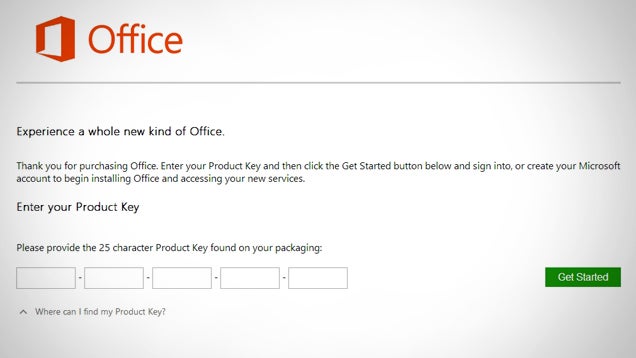
If your computer came with Office 2013 pre-installed (or if you lost your installation disc), you can still reinstall Office with your product key—you just need to download it straight from Microsoft.

Head over to officesetup.getmicrosoftkey.com (which is an official Microsoft download page) and enter your product key. This may be on a Certificate of Authenticity included with your computer or a product key card you purchased at a retail outlet. Once you put in that product key, you can then download the appropriate version and install with that same key.

If you registered your copy of Office 2013, you don't even need the product key. Just visit office.microsoft.com, click Install Office, and then log in to your account to download it.

Download Office 2013 From Microsoft Using Product Key | Into Windows


View the Original article

Rabu, 23 April 2014

Microsoft Now Accepts Universal Windows Apps As Its Insta-OEM Kit For Windows Phone Goes Live

Starting today developers can now link Windows Store and Windows Phone applications to create the already-announced “universal” applications that Microsoft announced recently at its Build developer conference.

Microsoft is working to unite development for its two core Windows platforms, incentivizing developers to create apps for Windows by making it easier to target two separate audiences while reusing much of the code between the applications. Microsoft is in the process of harmonizing its stores, but that process is not yet complete.

The company will eventually bring the Xbox One, another Windows-based machine, into the universal app game. The gist of a universal Windows app, according to Microsoft, is that it allows consumers to snag an app once, and download it for all compatible Windows devices. As we know, the devices that will be compatible with the app varietal will grow.

This morning, Microsoft released Windows Phone 8.1 to developers. TechCrunch published hands-on notes of the new code, the feature set of which was detailed at Build.

Also out today for developers is the ability to reserve application names for Windows Phone applications. Previously, this was only available for Windows Store apps. Keep in mind the theme: Harmonization.

Over the weekend, Microsoft announced the consolidation of application pricing tiers to better match Windows Store and Windows Phone applications. This change will see the addition of $0.99 and $1.29 apps into the Windows Store.

Shifting gears entirely, Microsoft’s Joe Belfiore announced today that the company’s OEM toolset to help manufacturers get up and running building Windows Phone handsets is live as well. You can’t do this in your garage, but the help could assist smaller, regional OEMs jump aboard Windows Phone. I suspect this offering is more enticing now that Windows Phone devices with smaller than 9″ screens are free.

IMAGE BY FLICKR USER MIXEvent UNDER CC BY 2.0 LICENSE (IMAGE HAS BEEN CROPPED) 

Microsoft Rolls Out The April Xbox One Update — Here’s What’s Inside

xb1 copy

Do you have an Xbox One? It’s update time! Get excited! Well, not too excited. Moderately excited.

Like the last few monthly updates, this month’s patch is mostly meant to bring in features that aren’t so much oh-my-god-brand-new as they are things that were surprisingly absent after the jump from Xbox 360 to Xbox One.

The new update should start hitting Xbox Ones this evening.

The things you’ll probably directly notice:

  • Games are now able to show a progress bar when a game is saving, rather than just a spinning icon.
  • You’ll now see alerts when an Xbox Live friend signs in. Microsoft says this was “one of the most requested features” — which makes sense, as it’s… kind of crazy that it wasn’t there to begin with
  • They’ve tweaked the GameDVR algorithm (the system that records the last few seconds of gameplay when you say “Xbox, record that!”) for better video quality.

The less obvious (behind-the-scenes) stuff:

  • Kinect’s voice/motion algorithms have been improved, with the main enhancement being a lower false-positive rate for “non-hand objects” triggering the sensor. If you’ve ever been laying on the couch and had the Kinect start tracking your foot, this is what they’re talking about
  • Blu-ray player hardware can now support 50 Hz video content, though the Blu-ray player app still won’t support it for a few days.
  • Improved controller/wireless headset connectivity
  • The Xbox One can now power cycle itself automatically after an overnight/standby update; previously, you’d have to manually reset the Xbox One if it updated while in standby mode.

Alas, still no sign of HBO GO.

Senin, 21 April 2014

Turning The Ship: Microsoft Might Have Begun A Subtle Shift From Windows To Services

Since Steve Ballmer passed the torch to Satya Nadella earlier this year, it marked a sea change in the organization: the first time in its history one of the founding team wasn’t running the show. Changes were expected and have happened. A surprising one is a subtle shift toward a service model and what appears to be an understanding that as long as people are running Microsoft tools, the hardware and underlying operating system don’t matter.

For a company that has been driven by the underlying OS for most of its existence, this is not a minor matter

It’s highly likely that such a shift started long before Nadella took the reins at Microsoft, but when it comes turning a ship the size of Microsoft, sometimes perhaps it takes a new leader to push the company in the new direction.

That’s partly because being such a large organization, Microsoft doesn’t just have to deal with the nuts and bolts of a shifting strategy, they also have to deal with internal politics and a strong culture that might fight any change. There is a hard and fast attitude inside many large organizations that any change is a threat on some level because it has impact on your power within the organization, whether you consciously acknowledge that or not.

Part of being a CEO is finding a way to manage the politics and culture and start the shift to a new way of working. Maybe Ballmer, because of his longevity and his own biases, simply wasn’t capable of bringing the company to the next level. That would take a new leader with a different vision, alliances and biases.

David Linthicum writing about the difficulty organizations have moving to the cloud pointed out, rightly in my view, that what was holding back many organizations from going all in on the cloud was not the technology itself, but that it required a cultural change inside IT to make it happen. I believe a similar dynamic plays out in any large organization when it comes to any major change.

So it was telling when one of Nadella’s chief lieutenants, executive VP in charge of operating systems Terry Myerson, told ZDNet’s Mary Jo Foley that he was OK with a services model. Specifically, when she asked about the Nokia X line of phones–those new low-priced Android phones running Microsoft services announced at Mobile World Congress. He was cool with a phone running Android, precisely because he was happy to see Microsoft services running on as many devices as possible, regardless of the operating system

This is a huge acknowledgement from a senior executive that as a company, they see the value of selling services over the old Windows-Office model in which you bought Windows and ran Windows software. It remains how they make a good deal of their money.

Simply acknowledging this idea of services on many devices and operating systems is a change for Microsoft, and although it may be a quick answer to a question by a Microsoft executive, it shows a shift in vision that I don’t recall seeing before.

Of course, this one remark doesn’t mean the whole company has a new attitude about this, but even talking in these terms is a huge step for Microsoft, and if Nadella can continue to turn the ship, you never know.

It’s worth noting that I remain a skeptic that Microsoft can truly make this change, until proven otherwise, but I’m impressed to see at least some inklings that this old dog maybe could learn some new tricks. You never know.

Jumat, 18 April 2014

Microsoft Office Mobile

Microsoft Office Mobile-1Microsoft Office Mobile-2

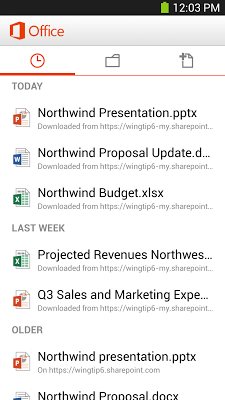
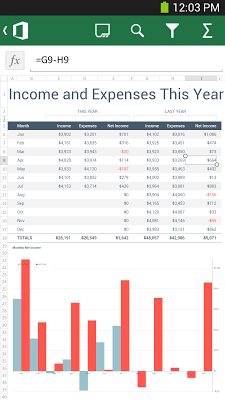
Microsoft Office Mobile is the official Office companion optimized for your Android phone. You can access, view and edit your Microsoft Word, Microsoft Excel and Microsoft PowerPoint documents from virtually anywhere. Documents look like the originals, thanks to support for charts, animations, SmartArt graphics and shapes. When you make quick edits or add comments to a document, the formatting and content remain intact.*

KEY FEATURES:
Access documents from virtually anywhere:
•    Cloud – With your phone, you can access Office documents that are stored on OneDrive, OneDrive for Business, or SharePoint.
•    Recent Documents – Office Mobile is cloud-connected. The documents you’ve recently viewed on your computer are readily available on your phone in the recent documents panel.
•    Email Attachments – You can view and edit Office documents attached to email messages.*
Office documents look stunning:
•    Great-Looking Documents – Word, Excel and PowerPoint documents look great on your phone, thanks to support for charts, animations, SmartArt Graphics, and shapes.
•    Optimized for phone – Word, Excel and PowerPoint have been optimized for the small screen of your phone.
•    Resume Reading – When opening a Word document from OneDrive or OneDrive for Business on your phone, it automatically resumes at the place where you left off reading, even if you last viewed the document on your PC or tablet.
•    Presentation Views – The Slide Navigator view in PowerPoint lets you browse slides faster, while speaker notes help you practice your presentation.
Make quick edits and share*:
•    Documents Remain Intact – Formatting and content remain intact when you edit Word, Excel, or PowerPoint documents on your phone.
•    Create – You can create new Word and Excel documents on your phone.
•    Comments – You can review comments that have been made in Word and Excel documents on your phone and add your own comments.
* Sign in with a free Microsoft account to create, edit and save documents for home use. A qualifying Office 365 subscription is required to create, edit and save documents for business use. Qualifying plans include: Office 365 Small Business Premium, Office 365 Midsize Business, Office 365 Enterprise E3 and E4 (Enterprise and Government), Office 365 Education A3 and A4, and Office 365 ProPlus.
Requires a phone running Android OS 4.0 or later.

Size : 27M
Current Version : 15.0.2720.2000
Requires Android : 4.0 and up

Download


View the Original article

Kamis, 17 April 2014

Microsoft OneNote updated, lets you create OneDrive notebooks and sections

onenote

Today Microsoft is bringing out a new update to its OneNote Android app, bringing the ability to create Notebooks directly on your OneDrive account from your Android devices.

Creating a notebook is extremely easy, as all you need to do is tap the overflow menu within the Notebooks list and then tap “create notebook”. Once the notebook is created, it’s equally easy to create and delete OneDrive Notebooks sections as well.

In addition to the notebook and section support, today’s update also brings several bug fixes and performance improvements. Although Microsoft doesn’t give a full list of what bugs it is addressing, we do know that it is solving some existing problems with pasting from the clipboard.

To get in on the latest version of OneNote, you’ll want to head on over to Google Play. Have you downloaded the latest version, if so, notice any other changes not mentioned in the change-log? In general, what do you think of OneNote versus Evernote and other similar note-taking apps? Let us know in the comments!

Sabtu, 12 April 2014

Unsurprisingly, Microsoft Is Bullish About Developer Reaction To Its New Tools

This morning Microsoft announced a grip of new developer tools and other goodies at its Build conference in San Francisco. Crowd reaction during the lengthy keynote appeared to be mostly friendly to the stage show.

I sat with Microsoft’s corporate vice president Soma Somasegar this afternoon after the dust had settled some, to get his take — report card, if you will — on how developers viewed Microsoft’s newly unveiled efforts that he had a large hand in. He rates response thus far as “extremely good.”

Specifically, Soma indicated that work announced to allow for so-called “universal apps” that will see code shared between Windows and Windows Phone applications greatly rise, has been popular. That’s fair, matching what I’ve heard myself.

Soma also said Roslyn was receiving strong response from developers. What’s a Roslyn, you ask? Soma called it a compiler-as-a-service, and Microsoft announced today that it will become an open-source tool. Compilers have been, in Soma’s eyes, akin to “black boxes.” The idea with Roslyn is to change that by giving developers full access to the guts of the thing.

I asked Soma about momentum with Azure, Microsoft cloud storage and its computing service. In his estimation, when Azure introduced infrastructure as a service (IaaS) capabilities, it reached a turning point of sorts. Market interest in Azure is now growing by “leaps and bounds.”

What the above indicates is that Microsoft is optimistic that what it built and released and announced today is sitting well with the very people it is strenuously looking to court.

What’s fun is that we’ll be able to vet market reaction independently: If development rates pick up, and more apps are released for Microsoft’s platforms, its bets succeeded. If we see a flattening, or even decline, Microsoft will have failed. Furthermore, a minor incline is not enough. Microsoft needs to greatly increase the pace at which developers build and release apps for its greater Windows platform.

IMAGE BY FLICKR USER ImagineCup UNDER CC BY 2.0 LICENSE (IMAGE HAS BEEN CROPPED) 

Jumat, 11 April 2014

Microsoft Is Bringing the Start Menu Back to Windows 8

Microsoft Is Bringing the Start Menu Back to Windows 8

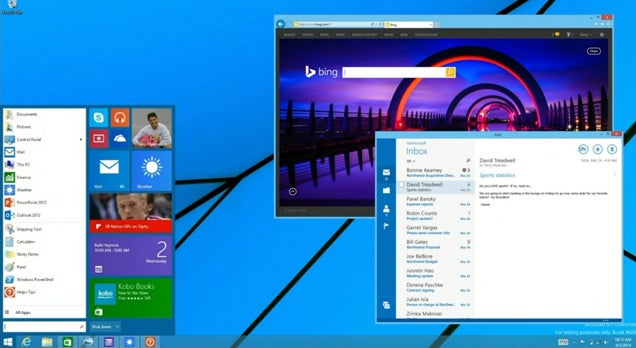
Windows 8.1 is getting some upgrades really soon, but Microsoft also announced a future upgrade to Windows 8 that everyone's been asking for: the return of the desktop Start menu.

As if you haven't already replaced the Start menu on your own, Microsoft says they'll be bringing back the Start menu in a future update. It looks similar to the old one, but with a small tiled interface tacked on the side, which is actually pretty cool. Microsoft will also let tiled "Modern" apps run in a window on the desktop (which you can currently do with ModernMix). Better late than never, perhaps, but if you aren't doing this already with apps like Start8 and ModernMix, it's a nice upgrade we suppose.


View the Original article

Rabu, 26 Maret 2014

Microsoft And Nokia Now Expect Their Massive $7.2B Deal To Close In April

Nokia has informed the world this evening that it now expects its behemoth deal with Microsoft to close in April of this year, as opposed to the first calendar quarter, a timeframe that was reiterated earlier this year.

The deal, worth $7.2 billion, has wound through most of the regulatory bodies of the world that an agreement of its scale must. Microsoft published a blog post on the current situation, claiming to be “nearing the final stages of our global regulatory approval process.” Close, no cigar, and so forth.

What is causing the delay? Here’s Nokia: “[T]he transaction is pending approvals from certain antitrust authorities in Asia which are still conducting their reviews.”

The companies failed to reach the mark in time. This will cause analysts to revamp their models, Microsoft to wait to absorb the division, and force Stephen Elop to wait before assuming his post atop Microsoft’s now larger hardware division. Also, Nokia’s big payday is now a non-first quarter affair.

A blow for both companies, given that slipping into a new quarter wasn’t in their planning, but here they are. Both firms are still saying publicly that the deal will close.

My theory that the lingering tax issue regarding Nokia’s failure to secure and appeal in India, which has frozen a factory that is supposed to be part of the asset transfer was shot down by Nokia:

Nokia reiterates that ongoing tax proceedings in India have no bearing on the timing of the closing or the material deal terms of the anticipated transaction between Nokia and Microsoft.

Given that, we should see this beast locked down inside the next 30 days.  


Senin, 24 Maret 2014

Microsoft Now Offering $100 Discounts To Get Consumers Off Windows XP

As Windows XP winds down, Microsoft has a problem: People still use the operating system. Many people. Given that support for Windows XP ends on April 8, the number of days left in which the OS is mostly safe to use are all but spent.

To combat that, Microsoft has been offering discounts, in increasing increments, to induce consumers to get their backsides off the bench and into a computer that will be safe. So, Microsoft is handing out $100 discounts on a number of computers, including the Surface Pro 2. How is this economically feasible? All the machines cost $599.

As ZDNet’s Mary Jo Foley points out, the new computers come with “90 days of free support for their new Windows 8 devices from Microsoft.” Call that the Here’s How New Windows Works period.

The danger here is that, once general support for Windows XP ends, everyone not paying Microsoft large sums for custom support will be using an un-patched operating system that is incredibly insecure. Old code without patches means exploit heaven. Consumers at risk of being attacked isn’t great if you want to keep them as customers.

IMAGE BY FLICKR USER Dell Inc. UNDER CC BY 2.0 LICENSE (IMAGE HAS BEEN CROPPED)

Minggu, 23 Maret 2014

Kingsoft Office 5.8 (Free) - Good counterpart to Microsoft Office

Features & Use

Kingsoft Office 5.8 (Free) is a good counterpart to most Office programs for Android. After starting the app, you will be asked to agree with sending anonymous usage statistics - but never fear, you do not need to in order to use the app.

The first time the app is opened, the task bar at the top will be hidden, so you will prompted to tap on it to display the various menus and options. Clicking on the "All Documents" button at the top will show all the documents stored on your mobile device. The app supports a variety of different formats, including DOC, DOCX, TXT, XLS, XLSX, PPT, PPTX and PDF. One small downer right at the beginning though: ODT files (OpenOffice and LibreOffice) are not recognized. To read these documents with Kingsoft Office, you'll first need to save them as DOC or DOCX files.

kingsoftoffice screenshot bild1All your office documents at your fingertips on a tablet. / © AndroidPIT

PDF files can also be opened easily. But other than viewing or bookmarking there's nothing else you can do with them. Zoom works flawlessly with a two-finger gesture, if that's any consolation. In the supported text files you can get started right away though. The presentation of special characters also works quite well by the way.

The usual functions such as select, copy, cut and paste are quickly accessible with a double tap on the text and are fast and easy to use. Even when typing the app causes no problems, but, as always, the processing of documents using an app is still not as comfortable as on the laptop or PC. But this is a complaint common to all mobile platform editors. Anyone needing to regularly edit on the move would be well advised to invest in a physical keyboard. With this in hand though, Kingsoft Office may be used quite comfortably and, at the very least, will save on the weight of a laptop.

kingsoftoffice screenshot bild2A long press will bring up a magnifying glass appears to zoom in. / © AndroidPIT


The top tool bar plays host to many useful tools. You can search your document for content, make a spell check or change the font. However, on this note something must be mentioned: in the app you can't select different font sizes, you can simply enlarge or decrease the size of the text. Meanwhile, a handful of fonts are available, but without preview in the selection window. Bold and italics are also available, as well as various formatting and editing options (underline, strikethrough, highlight etc). Comments can be added to the document and so can bookmarks.

You can switch between the standard view you would know from your desktop or you can enter full screen mode which makes reading and editing on your phone a little easier. Documents can be shared directly in the cloud or via Evernote and sent via email. You can also set passwords for documents. If you need to handle multiple documents simultaneously, you can simply use the File Tabs and easily jump back and forth between different documents. When saving, you can change the file format and at the same time create new folders. You'll also have access to cloud services such as Google Drive, Dropbox or Skydrive.

When browsing your documents you can also search specifically for file formats. Using the menu option "Folders" you can set the default access location to the SD card or internal memory and find more options as well.

kingsoftoffice screenshot bild3Extensive editing tools and storage options. / © AndroidPIT


Kingsoft Office also handles tables and spreadsheets well - if you have created them with Microsoft Word Excel. If you have extensive formulas, however, these are sometimes messed up in the tables the app displays. The same goes for your own tables created using the app. As long as you only use the most rudimentary formulas, for example, simple additions, everything works out wonderfully. But for more complicated formulas, the app unfortunately doesn't seem to be able to handle them so well. So while the app handles the simple stuff very well, for me personally, the whole thing is still too cumbersome and limited on a tablet.

PowerPoint presentations can also be edited very quickly and easily. There are different layouts available and the presentation can be individualized and adjusted easily. Using Wi-Fi, you can share the finished work with with other seminar participants via the share option, for example. The preview function also provides various options and runs with no problems.

kingsoftoffice screenshot bild4 Creating tables on the tablet - a bit fiddly but it works! / © AndroidPIT


Pictures stored in the internal memory or the SD card can be inserted into presentations along with text boxes, charts, and notes. So if you ever forget a presentation, you could quickly prepare a PowerPoint with Kingsoft Office on the way to university or work and then access it from your computer when you get there or just run it from your phone. Kingsoft Office is quite capable of this.

Screen & Controls

Despite hosting many functions, Kingsoft Office 5.8 (Free) does not overload you with information. The menu at the top of the screen is very intuitive and all major options are within range. The working surface in the text box is free of interfering tools and opens a small context menu to copy or cut only when necessary. The whole user interface can be described as intuitive. On a tablet, the handling and management of text documents could hardly be easier. It may not be as good as a desktop, but it's about as good as it gets on a tablet.

kingsoftoffice screenshot bild5You can also easily create Powerpoint presentations on the go. / © AndroidPIT

Speed & Stability

Kingsoft Office 5.8 (Free) was always reliable and stable during the trial period. Every now and then there were small lags and delays during the selection of tools, however, the app never seems to crash and it opens documents and files very quickly.

Price/Performance Ratio

Kingsoft Office 5.8 (Free) is free and contains no advertising.

Final Verdict

Kingsoft Office 5.8 (Free) is a good multi-function tool when it comes to quickly writing or editing a document or creating a PowerPoint presentation on a tablet. The spreadsheets functionality has a bit of room for improvement for power users but are fine for the average user with limited need for formulas. But on the whole, the app delivers and is almost equal to the PC-based word processing software.

As an OpenOffice user, I'm not at all a fan that the ODT format is not supported. So if I need a document from the PC, I have to convert it to a supported file format first. That's not great in terms of usability but it's bearable in view of the scope of what Kingsoft offers. Tablet-based touch controls and mobile device editing on the go are, for me, an emergency option. Even though Kingsoft Office delivers in terms of performance and operation – there's still no beating a desktop for creating and editing office documents. But as far as mobile editing goes, Kingsoft Office is hard to beat.


View the Original article

Jumat, 21 Maret 2014

Microsoft Read A Blogger’s Personal Email And IMs, Court Docs Reveal

Microsoft caught and fired an employee who leaked confidential software to a French blogger. That blogger then published screenshots of Windows 8 to the Internet before Microsoft’s official announcement. The employee also secretly released, without authorization, a tool that could have allowed for the unauthorized activation of copies of Windows, potentially harming Microsoft’s ability to derive revenue from its software products.

The manner in which the leaker was caught was detailed in a suit filed by the U.S. government against the employee. (Microsoft commented on the situation. Its comment is included below.) Included in the report was a note that Microsoft decided it was within its legal authority to tap into the Hotmail account of the external blogger tied to the leaks, and read email and instant messages.

The blogger had emailed Microsoft looking for clarification regarding some of the software that he had received from the internal source. Microsoft connected the blogger’s email address to the publication where the leaks had been published. So the company took a peek.

Was it legal for Microsoft to do so? Microsoft’s Terms of Service allow it to access information in the accounts that are stored on its “Communications Services,” a group of products that may include: “e-mail services, bulletin board services, chat areas, news groups, forums, communities, personal web pages, calendars, photo albums, file cabinets and/or other message or communication facilities designed to enable you to communicate with others.”

The Terms of Service is blunt: “Microsoft reserves the right to review materials posted to the Communication Services and to remove any materials in its sole discretion.” That statement is preceded by a tepid promise of some sort of privacy: “Microsoft has no obligation to monitor the Communication Services.” Here are just a few of things that you are not allowed to use Microsoft services for:

Screen Shot 2014-03-20 at 1.00.13 PM

While Microsoft is within its legal right to access the emails in question, it is embarrassing for the company: It has spent untold sums attacking Google’s email service for its automatic scanning of email messages in order to better serve ad content against them.

Both Google and Microsoft scan email for viruses, making Microsoft’s contentions in the ‘Scroogled’ campaign tepid at best and asinine at worst. Thus, to have it become known that Microsoft is willing to enter accounts of a blogger — journalist, really — to plug their own hole is tinted with hypocrisy.

Microsoft won’t read your email unless they pretty much want to — then, too bad.

Microsoft provided TechCrunch with a statement regarding the situation and past actions:

During an investigation of an employee we discovered evidence that the employee was providing stolen IP, including code relating to our activation process, to a third party.  In order to protect our customers and the security and integrity of our products, we conducted an investigation over many months with law enforcement agencies in multiple countries.  This included the issuance of a court order for the search of a home relating to evidence of the criminal acts involved.  The investigation repeatedly identified clear evidence that the third party involved intended to sell Microsoft IP and had done so in the past.

As part of the investigation, we took the step of a limited review of this third party’s Microsoft operated accounts.   While Microsoft’s terms of service make clear our permission for this type of review, this happens only in the most exceptional circumstances.  We apply a rigorous process before reviewing such content.  In this case, there was a thorough review by a legal team separate from the investigating team and strong evidence of a criminal act that met a standard comparable to that required to obtain a legal order to search other sites.  In fact, as noted above, such a court order was issued in other aspects of the investigation.

You can decide on the morality for yourself. Here are the pertinent sections of the suit:

Screen Shot 2014-03-20 at 12.51.46 PM

Screen Shot 2014-03-20 at 12.52.15 PM

Screen Shot 2014-03-20 at 12.52.40 PM

IMAGE BY FLICKR USER TODD BISHOP UNDER CC BY 2.0 LICENSE (IMAGE HAS BEEN CROPPED)

Microsoft Will Now Deploy Two Legal Teams, Outside Former Federal Judge To Approve User-Data Searches

Following a court document revealing that Microsoft read the email of a third-party blogger to uncover an internal leak, the company this evening announced a policy change, effective immediately, regarding how it searches user data that is part of its own network of services. Noting that it couldn’t, in its view, get a court order to search itself as none is needed, it will instead add layers of protection between it and its own users’ data.

First, the company will deploy a second legal team apart from the “internal investigating team” to vet the need for the data search. Following, a “former federal judge” will review the case, such as it is, and grant a decision. Microsoft will only execute a search into, say, an Outlook.com account if the retired judge consents that there is “evidence sufficient for a court order.”

And the number of this type of searches will be revealed in the company’s regular transparency reports. Microsoft exempts its own employees from the above. If you are an employee and have data on any Microsoft service, consider it public to your employer.

The change in tack is interesting given its speed – Microsoft came under fire in the last day or so. The online reaction to Microsoft’s admittedly legal search of the blogger’s personal emails and IMs has been swift and negative. We need better legal guidelines to protect user data from the service-providing company. That said, the boundaries that the company erected, provided they are extended and strengthened in the coming months, are at least a decent start. I say that at the risk of being too optimistic.

Here’s Microsoft’s statement:

We believe that Outlook and Hotmail email are and should be private.  Today there has been coverage about a particular case.  While we took extraordinary actions in this case based on the specific circumstances and our concerns about product integrity that would impact our customers, we want to provide additional context regarding how we approach these issues generally and how we are evolving our policies.

Courts do not issue orders authorizing someone to search themselves, since obviously no such order is needed.  So even when we believe we have probable cause, it’s not feasible to ask a court to order us to search ourselves. However, even we should not conduct a search of our own email and other customer services unless the circumstances would justify a court order, if one were available.  In order to build on our current practices and provide assurances for the future, we will follow the following policies going forward:

  • To ensure we comply with the standards applicable to obtaining a court order, we will rely in the first instance on a legal team separate from the internal investigating team to assess the evidence. We will move forward only if that team concludes there is evidence of a crime that would be sufficient to justify a court order, if one were applicable. As an additional step, as we go forward, we will then submit this evidence to an outside attorney who is a former federal judge.  We will conduct such a search only if this former judge similarly concludes that there is evidence sufficient for a court order.
  • Even when such a search takes place, it is important that it be confined to the matter under investigation and not search for other information.  We therefore will continue to ensure that the search itself is conducted in a proper manner, with supervision by counsel for this purpose.
  • Finally, we believe it is appropriate to ensure transparency of these types of searches, just as it is for searches that are conducted in response to governmental or court orders.  We therefore will publish as part of our bi-annual transparency report the data on the number of these searches that have been conducted and the number of customer accounts that have been affected.

The only exception to these steps will be for internal investigations of Microsoft employees who we find in the course of a company investigation are using their personal accounts for Microsoft business.   And in these cases, the review will be confined to the subject matter of the investigation.

The privacy of our customers is incredibly important to us, and while we believe our actions in this particular case were appropriate given the specific circumstances, we want to be clear about how we will handle similar situations going forward. That is why we are building on our current practices and adding to them to further strengthen our processes and increase transparency.  

IMAGE BY FLICKR USER Robert Scoble UNDER CC BY 2.0 LICENSE (IMAGE HAS BEEN CROPPED)