Diberdayakan oleh Blogger.
Tampilkan postingan dengan label notification. Tampilkan semua postingan

Selasa, 29 April 2014

Notification Toggle Adds Settings and App to Android's Pulldown Bar

Notification Toggle Adds Settings and App to Android's Pulldown BarS

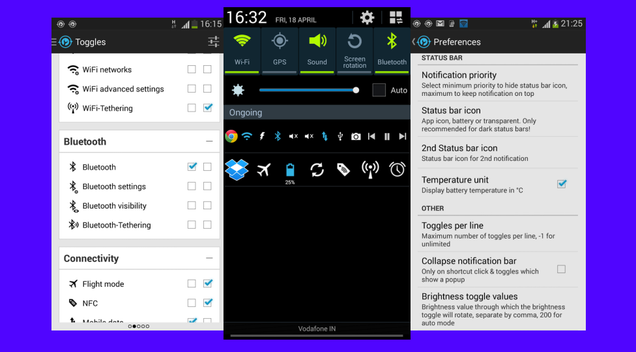
Android: Many Android smartphones come with shortcuts to settings when you pull down the notifications bar, but if you want more control over that, Notification Toggle might be just right to supercharge your notification shade.

The app is basically a quick launcher with access to common phone settings as well as apps installed on your device. It gives you two lines of icons in the notification shade. You can choose the toggles and apps you want and set them to appear on the line of your choice. Settings include Wi-Fi (networks, advanced, tethering), Bluetooth (settings, visibility, tethering), connectivity, sound, music playback, display, GPS, camera, alarm and much more.

Notification Toggle is also customizable in appearance, letting you change the toggle order of the apps, set the icons and colors, and even download alternative icons.

The premium version has shortcuts within apps, like a direct dial for a contact, a particular Dropbox folder, your music player and more, depending on the apps you have installed.

Notification Toggle (Free) | Google Play Store via I Love Free Software


View the Original article

Minggu, 23 Maret 2014

LEDBlinker - customize your Notification LED!

Features & Use

When you start the app, there will be a list of predefined apps and types of notifications you can get from them. You can then set the color in which you want the LED to blink when you receive a notification from one of these apps. For example, the pre-loaded SMS client, email app, Facebook and other such apps are defined here. All you have to do when you get here is simply choose what color you want the LED to be in each situation then you’re good to go.

The good thing for those with smartphones that don’t have an LED light for notifications on their phone is that LEDBlinker can also work through small icons on the screen when the phone is in sleep mode. In other settings, it is also possible to set the flashing interval times as well as vibration and sound settings, if desired.

In the user defined section, you can add a custom color for apps downloaded in the Play store or apps that have been sideloaded. You simply tap on the plus sign in the upper section of the screen and then select the app you want to define an LED color for. After this you can define the exact color, the blink rate and other such details for yourself and when notifications are triggered from this app, you will be able to see them before you even turn the screen on.

AndroidPIT LEDBlinker 1All your default apps are pre-loaded and you can set your own as well. / © Mario Ostwald

When I read that the app needs permissions for reading Facebook and WhatsApp messages I thought that you would be able to customize alerts to specific individuals. Unfortunately, on this assumption I was disappointed: a distinction will be made only between normal WhatsApp messages and group WhatsApp messages. Maybe this specific-contact feature is something that could still be added. It would certainly be a unique selling point over the competition. 

Screen & Controls

In terms of operation, LEDBlinker can be quickly mastered: basically you just have to click "LED On" in the respective app, then you can adjust the color and blink rate and test the notification. Also, when you create a "user defined" profile, ie an app that is not in the default list, it is easy to do and functions int he exact same way as the pre-defined apps.

Again, you can also set small icons or even the time to appear on the screen if you do not have an LED notification light. There are also battery saving measures, sleep mode as well as tones and vibration options in the settings.

AndroidPIT LEDBlinker 2User-defined profiles are simple to set up and you can select custom colors. / © Mario Ostwald

Speed & Stability

Considering the app is free there is really nothing to complain about, because the LEDBlinker app properly does what it sets out to achieve. The whole thing is very stable too, and unlike some competing apps that I have tested, LEDBlinker offers full customization of the color and blink rates for each app.

Price/Performance Ratio

The core app is free to download, and for less than two dollars you can upgrade to the full version, which offers mnay more customization options. The full version will give you even more customization possibilities. Other apps of this kind cost a similar amount but do not necessarily provide the same functionality as LEDBlinker, especially not in the free version.

Final Verdict

In its category, LEDBlinker is a really is a great app that fulfills almost every wish: you can define all possible types of notifications for LED color, sound and vibration for your apps.

The only thing I could say is missing from this app is the ability to actually set contact-specific notifications. We all know that when some people text or call us it's really important, while for others...not so much. This would be a useful addition to the app. Other than that it’s pretty solid and robust.


View the Original article

Sabtu, 22 Maret 2014

Pushbullet's IFTTT Channel Turns Any Trigger Into a Notification

Pushbullet's IFTTT Channel Turns Any Trigger Into a NotificationS

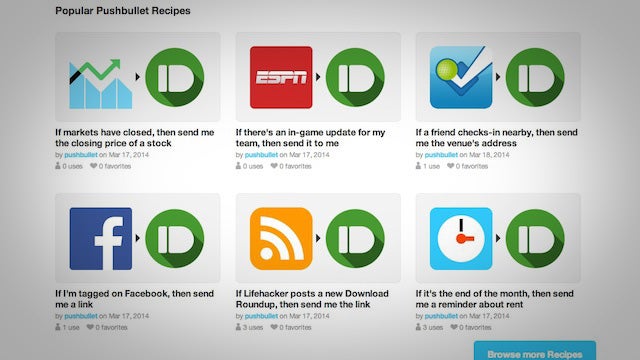
Pushbullet is a great way to get push notifications in your browser and on your phone. Now Pushbullet has an If This Than That channel so you can push customized info right to your Android or iOS device.

Pushbullet is essentially a way to easily send information between your computer and phone. The IFTTT integration means you can automate that process and set up custom notifications for anything that works with IFTTT. For example, you can set up a notification to alert you when a friend checks in nearby on Foursquare, someone on your calendar has a birthday, when a specific user posts to Instagram, and much more. It's still a new channel, so we'll have to wait and see what happens with it, but it could make creating custom notifications a lot simpler.

Pushbullet Channel | IFTTT via Android Police


View the Original article

Jumat, 21 Maret 2014

Facebook flirts with new notification bar idea

facebook logo

Facebook is keen to experiment with new Android features for its app, and its latest effort comes in the form of a persistent notification bar in the Android notification tray. This isn’t the first time that Facebook has hinted at including a persistent notification icon, the company previously tested out a more plain looking version last year.

This latest experimental option has only been made available to a limited number of users, and only began testing as of the start of this week. As you can see in the image below, the persistent bar offers up familiar notifications for friend’s requests, new messages, and general notifications for the app.

Facbeook-Android-notification

For the narcissists out there, the notification also features a persistent profile picture, staring back at you each time you check for updates. The little “i” icon contains options for the notification, including the choice to return to the more traditional notification system.

There’s no indication that this change is destined for a build fit for every consumer, but perhaps it’s an indication of the type of change that Facebook has planned for the future.

Like this post? Share it!