Diberdayakan oleh Blogger.
Tampilkan postingan dengan label feature. Tampilkan semua postingan

Rabu, 23 April 2014

LG G3 confirmed to feature 2K display [exclusive]

Kris Carlon

Kris Carlon

Putting down roots in Berlin after six years of traveling is a major step for Kris Carlon, who has spent more time living out of a tent lately than sitting at a desk. Kris comes to the AndroidPIT Editorial Team via a lengthy period spent writing on art and culture in Australia and other places he has lived. He joined the Android community while resurfacing in civilization back in 2010 and has never looked back, using technology to replace his actual presence in other people's lives ever since.

LG has confirmed that the upcoming LG G3 will feature a 2K display with 2,560 x 1,440 pixel resolution, as the image below confirms. We received the AnTuTu benchmark image claiming to be from the G3 and reached out to LG, who have officially confirmed that the G3 will have QHD resolution. This is great news for anyone feeling a little let down by other manufacturer flagship releases so far this year.

LG G3 Benchmark androidpitThe display resolution from this benchmark has been confirmed to be from the LG G3. / © AndroidPIT

While there's no juicy information in the image leaked to us relating to the processor, it seems highly likely that the G3 will pack at least a Snapdragon 801 chipset, backed up by Adreno 330 GPU. This will put it ahead of the pack even further, even if it is released several months later than the Galaxy S5, Xperia Z2 and HTC One (M8). While 2K resolution on what we expect to be a 5.5-inch screen will be a power-sucker, if anyone can handle battery and display with finesse it's got to be LG.

lg g3The G3 will be at the front of the pack where display quality is concerned. / © LG

If the G3 does indeed arrive with a 5.5-inch display, the resolution will come in at 534 ppi. While we can't confirm that the bezels you see in the image come from the actual G3 or not, they do look similar to the LG G2, and there are no visible hardware buttons on the side of the pictured device. We're still hoping that LG will manage to squeeze that display into a chassis not much larger than the G2, but with the same bezels that might be a tall order. At this point we can assume that the G3 will house a quad-core Snapdragon 801 or 805, depending on its actual launch date and the availability of the Qualcomm chips, along with 3 GB of RAM to match its next-gen specs. We're expecting to see the G3 sooner rather than later, so keep your eyes peeled for an announcement before too long.

[Update: our friends at UberGizmo got their own benchmark shot from what looks to be the same source. Their AnTuTu screen comes an hour after ours and shows slightly different details. Their pic shows a pixel density of 640 ppi, which seems highly unlikely. The LG G3 would need to have a 4.6-inch screen for that number to be accurate.]

Are you happy to see LG is leading the pack on the display front? How do you think LG will manage the power requirements of 2K resolution?


View the Original article

Selasa, 22 April 2014

Silence Lengthy Reply All Threads with Gmail's Mute Function 2014

Silence Long "Reply All" Threads with Gmail's Mute Feature


Silence Lengthy Reply All Threads with Gmail's Mute Function 2014


We've all been there: you get caught in an e mail thread the place everybody's replying all and though it's now not related to you, it never ends. Gmail can help you mute these conversations.

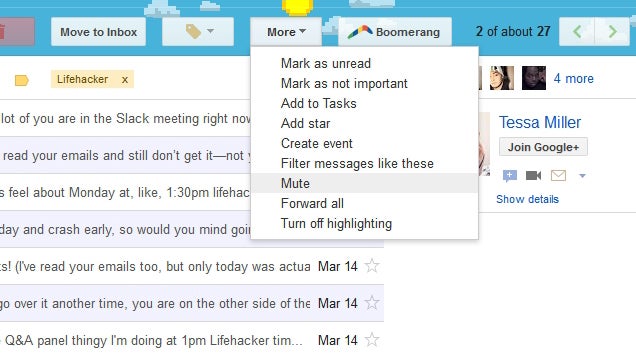
Gmail's mute button is actually an old feature—a really old feature—but it's one of those under-the-radar ones that many of us completely forgot was there. So when Slate wrote about it this week, we figured it was worth a reminder: If you get caught in one of these endless email threads, just head to More > Mute. It won't delete the emails from your inbox, but new messages won't be marked as new, which is a godsend.


You can also do this in Outlook for Windows by clicking the "Ignore" button under the Home tab of the ribbon. Want more Gmail tricks? Check out all the clever things you can do with its built-in features.


The best way to Save Your self From Infuriating Reply-All E-mail Chains | Slate


Posted by: http://gosspot.com/

Writted by: totor


View the Original article

Minggu, 20 April 2014

Carriers block Samsung Galaxy S5 Download Booster feature

samsung galaxy s5 download booster screenshot

When Samsung first announced the Galaxy S5 one of the big software features it touted was Download Booster, a feature that uses both Wi-Fi and LTE to make downloading files faster, but as with so many things, most U.S. carriers block the feature on their versions of the phone.

AT&T, Sprint, and Verizon all block the Download Booster on their models of the Galaxy S5. T-Mobile is the only big four carrier that supports the feature. U.S. Cellular also allows the feature, for those who live in the regional carrier’s service area.

Presumably the feature is turned off so it doesn’t put a strain on LTE networks. Verizon doesn’t give a reason as to why it blocks the feature on the Galaxy S5, but does confirm it’s “not currently supported” in the Q&A section of its product page. For its part, Sprint omitted any mention of the feature from its user manual for the Galaxy S5.

Unfortunately, it isn’t the least bit surprising that carriers have blocked the feature. U.S. carriers have a history of blocking features in smartphones. AT&T notably blocked FaceTime over cellular on the iPhone 4S, and later blocked video chat in Hangouts for Android, though it reversed course on both over time.

There’s an argument to be made that the feature was turned off so users don’t accidentally use too much of their limited data plans. There are ways around that by making the feature opt-in, or warning users about it, but three of the major carriers chose to just remove it instead.

The good news is if the lack of the Download Booster feature bothers you, it’s relatively easy to switch to T-Mobile so you can use it.

Does the lack of Download Booster on the Galaxy S5? Would it make you switch to a carrier that supports it?

Minggu, 13 April 2014

''Hidden'' feature: How to display unread emails only on Gmail

Loie Favre (translation)

Loie Favre

Loie Favre is a Canadian-German, food-loving, live-music-craving globe-trotter. Coming from a humble background in the Canadian Prairies centred around nature and the Arts, she studied Translation and Languages in Edmonton. She left his home on the Pacific Coast of Canada, to seek her fortune in Berlin. She is now an Editor and Manager for AndroidPIT.com and is enjoying discovering about everything and anything under the sun about Android.

You really can’t get away from using Gmail on your smartphone or tablet, but that being said, the Gmail for Android app still hasn’t received the optimization that we are used to on the web-based version. There is one option that doesn’t exist on the app, which you can use on your computer, that allows you to post only unread messages at the top of the page. Though this function has yet to arrive to Android, here is a workaround to make this happen anyways.

Gmail teaser© Google/AndroidPIT

It’s ridiculously simple:

  • Tap the magnifying glass on the top left corner of your screen to launch the search function.
  • In the search field text box, enter is:unread in:inbox
  • Launch the search and there you go! All the unread messages come up first.

To be able to access this faster the next time, you simply need to open the search again and this time choose is:unread in:inbox from the search history. In worst case scenario (especially if you use the search function a lot), you just need to scroll through to find it.

We admit that this solution could be a bit cumbersome, but it suffices for the time being. But honestly, Google should get on top of adding this function to its app or at least creating an equivalent!

Do you know any other tips and tricks for Gmail?

(originally by Quentin Ducreux)


View the Original article

Sabtu, 12 April 2014

Nest Halts Sales Of Protect Smoke Alarm Over Safety Concerns About ‘Wave To Dismiss’ Feature

Nest CEO Tony Fadell has just issued a notice recommending users disable the Protect smoke alarm’s ’wave to dismiss’ feature. In testing, it was discovered that people could accidentally trigger the dismiss feature, delaying a smoke alarm.

Sales of the Nest Protect have also been halted.

He recommends that users disable the feature for now, and says Nest is going to update units that will allow the feature to work correctly. In addition, if your Nest Protect is connected to the Internet via Wi-Fi, it will have the feature disabled automatically.

Until the feature has been corrected, users can tap the button on the unit to silence alarms.

“At Nest, we conduct regular, rigorous tests to ensure that our products are the highest quality,” says Fadell. “During recent laboratory testing of the Nest Protect smoke alarm, we observed a unique combination of circumstances that caused us to question whether the Nest Wave (a feature that enables you to turn off your alarm with a wave of the hand) could be unintentionally activated.”

Fadell says that the testing will take two to three months, and that they will update consumers as they progress.

“We’re enormously sorry for the inconvenience caused by this issue,” he continues. “The team and I are dedicated to ensuring that we can stand behind each Nest product that comes into your home, and your 100% satisfaction and safety are what motivates us. Please know that the entire Nest team and I are focused on fixing this problem and continuing to improve our current products in every way possible.”

In a related FAQ, Nest says that it had observed the issue in testing and has had no reports of it from any customer. There are also instructions provided that will allow users to disable the feature even if the units are not connected to the net.

The post notes that if any consumers do not want to keep the Nest Protect, a complete refund will be offered. Somewhat ironically, the Nest Wave feature was promoted heavily as a benefit of owning a Protect unit.

On the plus side, because this is a device that has built-in software and connects to the net, it can be updated remotely to fix software-related issues. But recently, an issue with a Nest Thermostat software update caused problems with Wi-Fi and batteries in some units, highlighting the delicate nature of software that powers our environmental systems — and that we trust with our safety.

The Nest Protect was the company’s second product after the Nest Thermostat. Nest announced plans to be acquired by Google for $3.2 billion in cash in January.

Kamis, 10 April 2014

Google Brings Back the "Search Nearby" Feature in Maps

Google Brings Back the "Search Nearby" Feature in MapsS

The new Google Maps is looking great, but many of us sorely missed the superb and simple "search nearby" function that unexpectedly vanished. Now, it's finally back.

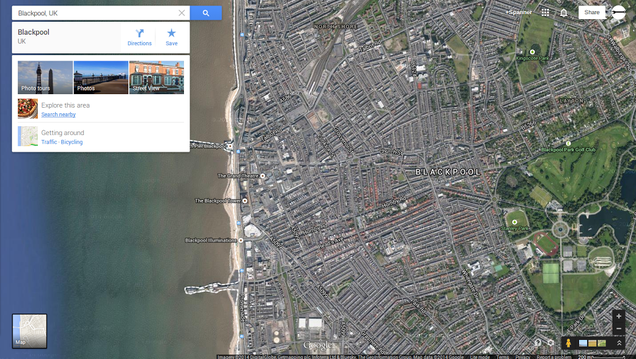
Although it was little more than a text link at the bottom of your search results, the "search nearby" function in Google Maps was hugely popular for drilling down into exciting locational discoveries. When the revamped Google Maps went live, there was a quiet outcry when "search nearby" was found missing. But casual cartographers around the world are throwing their hats in the air as the function has just been returned to the all-new Google Maps experience.

For the uninitiated, "search nearby" narrows your location searches to the on-screen map, allowing for local places of business and interest to be revealed without actually knowing precisely what you're looking for. It begins by searching for an address—let's say a friend's house you're visiting—and then clicking the "search nearby" link in the results. For example, you might want to find bars or pizza places near your friend's house, so the search engine narrows its field of vision to that particular area. Simple and classic.

Head over to Google Maps to try it out.


View the Original article

Jumat, 21 Maret 2014

Report: Rumored HTC Nexus tablet may feature 8.9-inch display

HTC logo aa 1

Back in February, a report surfaced out of Taiwan that claimed HTC had won a bid to build a new high-end Nexus tablet. Since then, we’ve heard very little else about this rumor, until today.

According to the research firm IHS Technology, Google and HTC are teaming up to create an 8.9-inch “high-performance” Nexus device. IHS’ Rhoda Alexander indicates volume production “is expected to start in July or August. The expectation is [that] this will be a lower volume product, carrying a premium price tag to support the specifications.” Alexander says she is unsure of the pricing that Google is targeting, but wouldn’t be surprised if it arrives with a tag higher than $299.

Google and HTC are reportedly teaming up to create an 8.9-inch high-performance Nexus device

In other words, the HTC Nexus 8.9 would be a high-end alternative that co-exists with the Nexus 7, and perhaps even the Nexus 10. While the latter two tablets are geared more towards everyday consumers, the Nexus 8.9 would be a premium device that climbs further upmarket — sort of like what Samsung is trying to accomplish with the Galaxy Pro series.

So would such a move actually make sense? Maybe. While some folks are perfectly happy with the plastic (yet still high quality) builds of devices like the Nexus 7 and Nexus 10, an aluminum body tablet with boomsound speakers certainly sounds like a nice alternative for those looking for something a bit more ‘premium’ looking.

On the other hand, IHS doesn’t specify where it is getting this information from, and might simply be building on existing rumors we’ve heard from publications like Focus Taiwan. Bottom-line, we’d take the whole rumor with a grain of salt for now.

What do you think, would you like the idea of a higher-end HTC tablet with an 8.9-inch display? Would you willing to pay premium pricing for such an offering?

Like this post? Share it!