







Diberdayakan oleh Blogger.
Tampilkan postingan dengan label again. Tampilkan semua postingan

Jumat, 02 Mei 2014

lg rumor 2 in Sprint UA profile, QHD displayappears again (Updated)

lg g2 drop test aa 09
Update:
Sprint has made a few revisions to its User Agent profile listing for the LG-LS990 (LG G3). Fortunately the QHD display remains, instead the alterations affect the device’s RAM and camera specifications.
The handset’s RAM has dropped back down to 2GB from 3GB, putting it back inline with the LG G2. On the plus side, the camera modules have received a bump in resolution. The profile now lists the device as having a 16 megapixel rear camera, and the front facing sensor has also received a slight boost to 2.4 megapixels. We’ll have to wait and see what other changes this brings compared with the G2′s camera.
Finally, the software number has changed to “LS990ZV1″ but the profile still states that the device comes with Android 4.4.2, so the update is most likely making adjustments to LG’s specific features.
Original Article:
Back in mid-March a user agent profile from LG’s own website suggested that the upcoming LG G3 would come with a QHD (1440×2560) pixel resolution display. In fact, we’ve been hearing similar rumors since the beginning of the year. These details have been spotted once again, this time in a user agent profile from US carrier Sprint. As well as hinting yet again at a QHD display, the profile contains virtually an entire hardware spec sheet for LG’s next flagship smartphone.
The device in question is listed as the LG-LS990, which is expected to be the Sprint version of the LG G3, whilst the carrier-less version retains the D850 tag that we have seen before. If the QHD displays turns out to be correct, it’s likely that LG will be using the 5.5 inch QHD display that it already unveiled, which has a pixel density of 530ppi.
As well as display information, the UA suggests that the LG G3 will be sticking with a Qualcomm Snapdragon 800 processor, like the one found in the G2, rather than the slightly updated Snapdragon 801 chip found in other new flagship handsets. Sadly then, this spec suggests that the G3 won’t be one of the first smartphones to feature the upcoming Snapdragon 805 SoC. LG also seems to have brought the RAM count up to 3GB this time around.
Here’s the full spec according to Sprint’s LS990 UA Profile:
  • SoC: Qualcomm Snapdragon 800 MSM8974
  • CPU: Quad Core Krait 400 (probably clocked at the standard 2.3GHz)
  • Display resolution: QHD (1440×2560)
  • RAM: 3GB of RAM
  • Internal storage: 32GB
  • External storage: MicroSD cards up to 64GB
  • Rear-facing camera: 13MP (image resolution: 4160×3120)
  • Front-facing camera: 2.1M (video resolution: 1920×1080)
  • Operating system:  Android 4.4.2 KitKat
  • Cellular connectivity: LTE / EVDO / IS2000
  • Other connectivity: GPS, Wi-Fi, Bluetooth
Sources below.
Of course, this could always be a preliminary spec given to Sprint to help prepare its marketing material, LG may change one or two things before the official announcement. What do you make of the LG G3 based on these specs?

Kamis, 24 April 2014

Flash Drives Are Cool Again, iOS Controller, 840 EVO 1TB, iPads

Flash Drives Are Cool Again, iOS Controller, 840 EVO 1TB, iPads

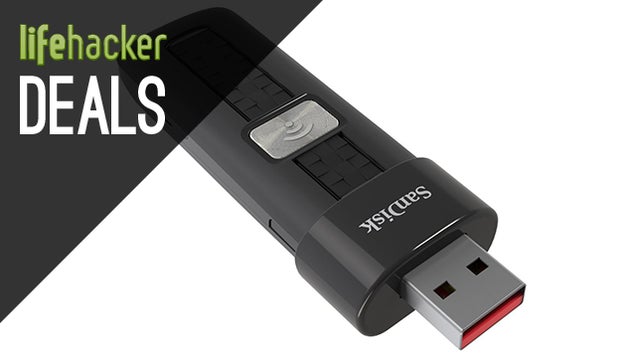
This SanDisk flash drive is part of the company's Connect line. The drive streams your media, including documents and video, to your Mac, PC, iPhone, Android, or Kindle, and doesn't need to be plugged in or have a router or an Internet connection to work. The 64GB model is sitting at its lowest price ever, while the 32GB is damn close.

SanDisk Connect 64GB Wireless Flash Drive | $80

SanDisk Connect 32GB Wireless Flash Drive | $50


Flossing is one of those tasks that is both essential and annoying. Make that process a breeze (or rather a blast (of water (or mouthwash))) with the Philips Sonicare Airfloss Electric Flosser. Wireless, rechargeable, versatile. travel-friendly, and most importantly effective. I've never considered switching back to standard floss since going electric. $50 today after clipping digital coupon. [Amazon]


Flash Drives Are Cool Again, iOS Controller, 840 EVO 1TB, iPads

iPad Mini Retina with $50 Target gift card + 5% off with REDcard

iPad Air with $50 Target gift card + 5% off with REDcard

For both these deals, an additional 5% off can be had by using coupons from the Cartwheel app, in-store.


Flash Drives Are Cool Again, iOS Controller, 840 EVO 1TB, iPads

Amazon is running another promo on their Kindle Fire HD line, but today they're taking things a step further by tacking on an additional 10% off for Prime Members. Here's a free trial.

Starting prices below, which of course go up if you up the storage. Extra 10% off shown at checkout.


Flash Drives Are Cool Again, iOS Controller, 840 EVO 1TB, iPads

MOGA Ace Power may not be the final word in iOS controller shells, but it does include dual analog sticks and an external battery for your phone, and it's at its lowest price ever today. $66. [Amazon]


Flash Drives Are Cool Again, iOS Controller, 840 EVO 1TB, iPadsS

Whether you want a 2DS or 3DS XL, today is a good day to get one. The highlight here is the 2DS bundled with Pokemon X for $100, which is an extremely low barrier to entry to get yourself into that portable game ecosystem. Target is also throwing in a $40 gift card with the purchase of a 3DS XL, effectively bringing the price down to $160.

2DS with Pokemon X | $100

3DS XLs with $40 gift card


Flash Drives Are Cool Again, iOS Controller, 840 EVO 1TB, iPads

Samsung 840 EVO 1TB | $455

Samsung 840 Pro 256GB | $180


Flash Drives Are Cool Again, iOS Controller, 840 EVO 1TB, iPads

Save on the Cameras you want with these Bundles


Apps

iOS

Android

Phones and Tablets

Computers

PC Parts

Storage

Power

Headphones

Home Theater

Home

Fitness

Tools

Apparel

Photography

Movies

Television

Books

Gaming

Inventory


This post is brought to you by the Commerce Team, a dedicated group of deal hunters and product enthusiasts. We operate independently of Editorial to bring you the best bargains every day, share our favorite products with you, and ask you about yours. When you buy something we recommend, we may also get a small share of the sale. We welcome your questions and want your feedback.


View the Original article

Sabtu, 19 April 2014

How to make your Samsung Galaxy S2 awesome again

Let’s give it up for the continual love for older devices. Whether you’ve found the one true device that you absolutely love or circumstances are keeping you with something that isn’t cutting edge, there’s nothing wrong with mobile devices that are a few years old. Sure, they may not be as fast or smooth as the stuff coming out right now, but that doesn’t mean you should discount them entirely. Today, we take a look on how you can make your Samsung Galaxy S2 awesome again.

FrontTeaserStill using the Galaxy S2? Check out our following tips! / © AndroidPIT

As with all our other guides to revamp your older mobile devices, this is a mix between installing new software or firmware, buying some nifty accessories, or other cool little tricks to revamp devices. Some of the tricks highlighted here aren’t unique to the Galaxy S2 and can be used across multi-devices if you should so choose.

Get the latest and greatest on the Galaxy S2

Official support for the Galaxy S2 was ended quite some time ago by Samsung. Thankfully, the developer world has taken it by the reigns and decided to give the older device some much needed firmware upgrade love. While you may not be able to get a pure Android experience, you can try out KitKat features with the help of CyanogenMod.

galaxy s2 cyanogenmod© Samsung, Cyanogen Inc, AndroidPIT

We highlighted the actual method of installing CyanogenMod 11 on your Samsung Galaxy S2 in our previous article, but the gist of it is as follows: root your device, download the proper firmware, install a custom recovery, and flash the CyanogenMod ROM. Best of all? The process has been made all the more easier with the help of the CyanogenMod Installer. While before you had to do a lot of the grunt work yourself, the installer makes it super simple for both PC and Mac OS. 

If CyanogenMod isn’t your flavor, check out our previous article highlighting some of the best custom ROMs for the Galaxy S2.

Extend that battery

If your original battery is as old as the Galaxy S2, then you’ve got three years of charging and draining that have most likely sapped its efficiency down to next to nothing. Luckily, the Samsung Galaxy S2 sports a replaceable battery that can be swapped out for a newer one, or in this case, something much beefier.

batt2© Android Central

There are various resellers who offer tons of options in terms of replacement batteries: some that are just third party batteries that will replace your original S2 battery, others than add a ton more beef and come included with a new back case to handle that extra oomph.

Check out various resellers on Amazon and ebay for more options. Always make sure that the battery you’re looking at buying is compatible with your version of the Galaxy S2.

Get it on the USB bandwagon

Did you know that you can use USB powered devices with your Galaxy S2? To do this, you need an adapter cable and from there it’s basically just plugging in everything to your S2. This will allow you to use your USB devices, such as mouse, keyboard and even USB thumb drives. Much like most accessories, Samsung has discontinued making official accessories for the Samsung Galaxy S2, but you can find a ton of third party options through other resellers.

usb otg cable© fnac.com

One thing to keep in mind, however, is that there isn’t a ton of power coming from the Galaxy S2, so if you were hoping of connecting to an external hard drive with your S2, it might not be enough to actually get the drives spinning.

What are some of your favorite things to make your older smartphones more awesome? Make sure to share them below in the comments!


View the Original article

Minggu, 23 Maret 2014

Make your Galaxy Note 2 awesome again

In our continued series of making older devices feel that much more new, we set our sights on the Galaxy Note 2 today. Sure, it has been replaced earlier in 2013 by the Galaxy Note 3, but that doesn’t make it any less awesome than it was when it first came out. For those of you looking to bring a little bit more to the table with their Galaxy Note 2, check out a few of our tips on how you can breathe some new life into it.

note 222© Samsung

Control it with your PC

Like we said above, this is by no means exclusive to the Galaxy Note 2, but it is something that you should definitely check out if you use your Galaxy Note 2 as a portable toolkit.  AirDroid is a fast and free solution to manager your android device from your desktop computer. The connection is made without cables and you can easily control your android with mouse and keyboard.

airdroid© AirDroid

You can send SMS, load data to the device, install apps, delete or move data around, take screenshots, and a ton of other things. AirDroid is intuitive to use, does not require any root rights and should be staple for all android users.

Ditch Touchwiz, Get CyanogenMod, Profit

If you’ve stuck around with Touchwiz on your Galaxy Note 2 since you got it, it’s time to venture out of the walled garden and try something else. First, you’ll need to unlock and root your device (just follow our handy guide) and then you can go ahead and grab something a little bit more exotic, say, CyanogenMod?

cyanogenmod 11 galaxy nexus bootscreen© AndroidPIT

With a ton of features including PIE Mode, customizable lockscreens and quick launch guides, automated profiles based on location/connection, it’s hard to imagine why you wouldn’t give it a shot. Plus, with the CyanogenMod Installer officially supporting the Galaxy Note 2, installation is literally just a click away.

Stand it up

Let’s face it, the Galaxy Note 2 almost borders on a tablet-sized device.  As such, it’s not out of ordinary to want to be able to watch videos on it. I do it all the time with my tiny little smartphone (I’m ashamed to say it’s an iPhone 4S) when I’m at my desk doing work, so it would make sense to do the same for a Galaxy Note 2.

stand© Amazon

With the aid of a handy stand case, you can make watching videos or media a breeze and more comfortable than trying to prop it up against something. Plus, it doubles as a normal case for when you need to head out and take it with you. 

Turn it into a PC, sort of.

Probably one of the cooler accessories out there, this Smart Dock for the Galaxy Note 2 allows you to turn your Note 2 into a semi-computer. Great for if you’re on the road and need to get some work done in your hotel room and don’t feel like fiddling with the smaller screen on your Note 2 for extended periods of time.

stand1© Gottabemobile/AndroidPIT

This smart dock turns a HDTV into a workstation and has three USB ports, which you can connect a mouse, keyboard, and USB drive at the same time. As well, there is also a line out and charging port to complete the awesomeness of this dock.


View the Original article