Diberdayakan oleh Blogger.
Tampilkan postingan dengan label Support. Tampilkan semua postingan

Selasa, 29 April 2014

Official CyanogenMod support re-ignites the flame for 2012 Kindle Fire HD

cyanogenmod nexus 5 boot screen aa 1

Amazon is one of those companies that have successfully forked Android into their own ecosystem, particularly with the Kindle Fire line. Intended to be an e-reader and a tablet for consuming digital content, the Kindle Fire ran well with Amazon’s wide offering of e-books, movies and TV shows, as well as apps in the Amazon Appstore. While the Kindle Fire line’s market share is on the decline, Amazon enjoys a healthy revenue stream from the tablet from the sale of digital content.

But underneath it all, the tablet is a fairly capable Android device, and many an enthusiast actually bought the inexpensive Kindle Fire line in order to root and install custom ROMs. Most of these efforts were unsupported ROMs however, most of which were community supported. This is about to change, with the official CyanogenMod 11 support for the 2012 Amazon Kindle Fire HD 7″ and Kindle Fire HD 8.9″ introducing KitKat to the device.

Nightly builds are already available on official CM download channels, codenamed “tate” for the 7″ variant and “jem” for the 8.9″ device. These will require a rooted device with a custom recovery, which should not be difficult if you are into hacking and tweaking your Android device. Note that there is still no official CM support for the latest Kindle Fire HDX line.

Fire OS, the Android fork that comes with the Kindle Fire line is designed with simplicity in mind, and as such, it is considered to be very limited, especially by Android enthusiasts. Official CM11 support for the device should be a welcome development especially for users who are into breathing new life into older devices or repurposing these through custom ROMs.

Do you have a Kindle Fire HD? Are you looking into repurposing or reviving it with a custom ROM?

Senin, 28 April 2014

Google App Engine Gets GitHub Push-To-Deploy Support

Last summer, Google started allowing developers to use git to get their code onto App Engine to deploy their applications instead of using Google’s usual SDK. Starting today, developers who use the popular GitHub service to manage their code repositories will be able to do the same.

Developers can now connect their App Engine projects to their GitHub repositories and trigger a deployment by simply pushing their project’s master branch on the service to App Engine. By using the standard git tools to interact with App Engine instead of Google’s SDK, the deployment process should be a bit simpler for developers than when using Google’s own tools.

Git has also become such a standard technology for most developers — and GitHub such a widely used service — that failure to support it probably put Google at a bit of a disadvantage. Microsoft, after all, supports it for Azure and in its Visual Studio development environment, and deploying from git to AWS is also a pretty standard procedure.

github_deploy_gappengine

Dolphin Browser update adds Jetpack 6.1 support on Android 4.3 and 4.4

Dolphin Browser
Dolphin Browser is one of the most powerful and popular web browsers out there and today it received a sizable update. Among the new stuff included is better Flash Player support, better full screen HTML5 videos, and the Dolphin Jetpack integration with Android 4.3 and 4.4.

Here is a quick list of all the features as per the Google Play Store.

  • Dolphin Jetpack 6.1.0 integration on Android 4.3 and 4.4 devices
  • Better flash playing experience; How to play flash in Dolphin http://goo.gl/zE6U68
  • Better fullscreen experience for HTML5 videos
  • Auto-fit web content when pinch to zoom under desktop mode

By far the most important of which is the Jetpack 6.1 integration. For those who do not know, Dolphin Jetpack is an improved webkit that uses Dolphin’s HTML5 rendering engine to give you a better web experience. In other words, it makes HTML5 sites vastly more enjoyable to browser and use.

Along with the Jetpack integration, the update also provides better support for full screen HTML5 videos, improved Flash support, and improved text auto-fit on web pages. Chances are if you have Dolphin browser you’ve seen this update already. If you’re not a Dolphin user and want to check it out, you can find it in the Google Play Store here.

ES File Explorer returns some SD card support to your KitKat device (root required)

ES File Explorer SD Card

In a recent update to the Android operating system, Google made some changes to how external SD cards can be handled by apps within the system. The result, basically, is that applications have been stripped of their former ability and permissions to read and write files on an sd card. With file explorer apps being some of the hardest hit by this change, ES File Explorer has decided to fight back, having launched an update to their app that brings back full SD card read/write access, at least for those that have their phone rooted.

ES File Explorer is a wonderful application, it offers solid file management tools and an ever expanding list of extra features that you may not have expected out of a file explorer. For file management, you can expect much of the same functionality as you would find on any other operating system. Create folders, move/copy/paste your files between folders, rename files and folders, it can even zip and unzip (RAR) compressed folders. This same functionality extends well beyond your local device, as you can access your Google Drive, Dropbox, Box and other cloud storage locations using the same tools. The tabbed interface will also let you get into FTP servers, SMB/Windows shares and Bluetooth shares alike.

ES File Explorer Functions

The folks behind ES File Explorer have thought about almost any method of file storage and access that you may need, as such, extra features to the app include a download manager, a built-in web browser, the ability to not only access FTP servers, but to turn your device into an FTP server itself to share specified folders, and more. ES File Explorer can even start up its own wifi hotspot for other devices to connect with. In the end, there is little that you cannot do with ES File Explorer when it comes to accessing your files, and once you’ve got them, the app even has built-in photo gallery and media players to put your files to use.

Google’s decision to remove external SD card support has been met with some hostility. Users are not happy about this decision, especially those that have invested hundreds of dollars on buying SD cards and applications which have been incapacitated by this change. ES File Explorer had a history of bypassing the default Android constructs by offering root capabilities, including access to system files. This same spirit is evident in their recent update, version 3.1.2 brings the root-only ability to once again read and write files to an external SD card. Check for the update on your device, or hit the Google Play Store to download a fresh copy.

ES File Explorer Media Player

The update to ES File Explorer will not bring back the required permissions to all of your affected apps. It is still great to see a big player at least create a workaround to an otherwise annoying security upgrade. We hope that Google finds a way to securely return this functionality in the future, or at least to introduce a new level of app permissions to let us users decide if we trust apps with all of our precious files saved on our external SD cards.

Have you been affected by the KitKat external SD card limitation? What is your number one app that you can no longer use as you used to? Are you more willing to root your devices, or find a cloud storage solution for your files? So many questions, let us know your thoughts in the comments below.

Minggu, 27 April 2014

Ubuntu 14.04 "Trusty Tahr" Brings Small Changes, Long-Term Support

Ubuntu 14.04 "Trusty Tahr" Brings Small Changes, Long-Term Support

Canonical released the latest version of Ubuntu Linux this week, with a bit of polish all around. Here's what you'll find.

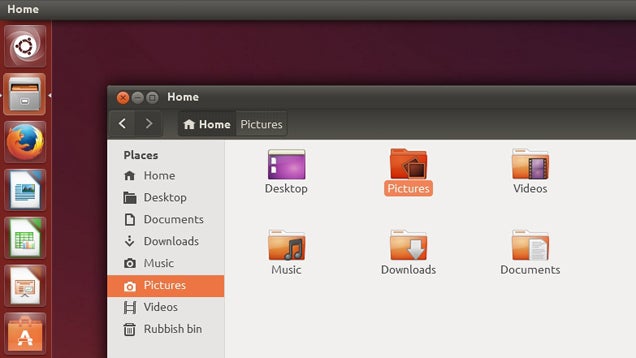
The latest version, 14.04—also known as "Trusty Tahr"—doesn't bring a ton of new feature to the OS, instead adding a bit of polish to the OS for its "long term support" release. 14.04 comes with a number of small tweaks to the appearance, like borderless windows, a new lock screen, some theme changes. It also brings menus back to the apps (rather than a universal menu bar along the top). And, as usual, built-in apps have been updated to their latest version.

Ubuntu One is unfortunately no longer, but the rest of the OS is a worthy update for Ubuntu users. Hit the link below to check it out, or see ZDNet's review for a more in-depth rundown of what's new.

Ubuntu 14.04 LTS


View the Original article

Sabtu, 26 April 2014

MLB.com At Bat adds Chromecast support, lets you enjoy the game on the big screen

There’s a lot to love about the Chromecast, such as its extremely affordable price tag and how it makes it easy to watch your favorite programming from Netflix, Hulu and several other popular sources. Even better, the Chromecast recently opened up its SDK to more developers and we’ve seen a stead trickle of brand new apps.

For baseball fans, however, the Chromecast’s lack of support for MLB.com At Bat has probably been a deal breaker up until now. The good news is that this changes today, as a new update has arrived to the At Bat app, making it easy to cast games over to the big screen.

Of course there is a catch: you’ll need to pay either $24.99 a month or $129.99 for an annual membership in order to have access to an unlimited number of live MLB games. Still, if you are a potential cord cutter looking for a way to get your baseball fix without having a traditional cable subscription, today’s update for Chromecast support is certainly a major win.

To grab the latest version of the app, you’ll want to head on over to Google Play.

Rabu, 23 April 2014

Google Glass Gets KitKat Support And Improved Photo Browsing, Loses Video Calls

Anybody will be able to buy Google Glass tomorrow, but ahead of this, Google is giving the Glass software an update. There are a couple of new features in this update, including new tools for making working with photos easier, but Google has also decided to remove the option to do video calls from Glass for the time being.

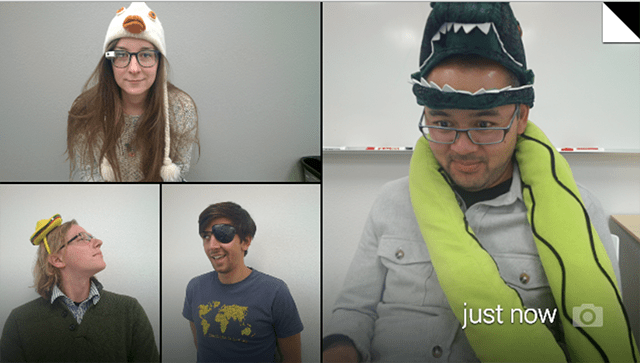
Google says video calls from Glass didn’t live out to the company’s “high standards.” Only about 10 percent of Glass users currently use them, and because of this, the Glass team has made “the hard decision to remove video calls from Glass until the experience is better.”

It’s unclear when this feature will return, but Google tells Glass users to keep an eye out for video-streaming apps in the MyGlass app library for third-party solutions. Given that video calls from Glass were always one of the device’s marquee features, it does come as quite a surprise that Google would remove this, even if just a few percent of its current users use it. 

Send photo message

As for the photo updates, Google now finally bundles photos together so when you scroll through your timelines, it’s not cluttered by lots of photos, and the photos you take are easier to find. Glass now bundles all your videos, photos and vignettes into a single bundle for each day. If you take a lot of photos on Glass, that’s definitely a major improvement.

Despite losing the video calling feature, Hangouts on Glass are still an option for chats, and with this update, Google now allows users to more easily send photos in Hangout messages.

Other new updates include a voice command menu that’s now sorted by frequency and recency, as well as the ability to more easily send feedback about Glass right from the device.

According to Google, there are a few more features in this update, too, but it hasn’t updated its Glass Journal blog yet. We will update this post with a list of all the new features as Google makes this information available.

Send feedback

Sabtu, 19 April 2014

Aereo Plans To Launch Chromecast Support On May 29th

Despite being in the middle of a battle to convince the Supreme Court that their service isn’t illegal, Aereo rolls on.

In case you’ve missed it: Aereo rents HDTV antennas to cordcutters for $8 a month to let them view and record live TV from their phones, tablets, and computers. The antenna stays at Aereo’s HQ, and all of the video data is piped to users across the Internet. Cable companies argue that because Aereo isn’t paying the retransmission fee that cable companies are required to pay, what Aereo is doing is illegal. They’ve dragged the matter into federal court twice now, and the courts ruled in Aereo’s favor both times; the Supreme Court is set to hear the case on April 22nd.

Following up on an informal pledge first made back in December, Aereo has just officially announced plans to support Chromecast by May 29th.

One catch: for now, at least, Aereo’s Chromecast support seems to be limited to Android. While Aereo does have an iOS app, there’s no mention of Chromecast support coming to it just yet.

Of course, this all depends on Aereo … you know, still being around by the end of May. According to Aereo investor Barry Diller, the company is more or less done for if the Supreme Court rules against them.

Google Play Music update brings Sonos support

Owners of Sonos sound systems can now play music straight from Play Music for Android, without having to switch to the Sonos app.

Even with native support for Sonos, you will still need the dedicated Sonos app installed on your device, but not having to stop your tunes to jump to a new app when you get home from jogging is a convenience we appreciate. The added Sonos support doesn’t entail any interface changes, as Google made use of the existing chromecasting icon. Pressing it will show all your Sonos devices, in case you own more than one, with the only requirement being that you are on the same Wi-Fi network. If you prefer using the Sonos controller app, you will be given the option to select Play Music from there (Android and iOS users alike).

Play Music is the first big music service that gains this sort of integration with Sonos products. “In Google Play Music, we’ve found a great partner to bring this vision to life for the first time on a global scale,” said the Sonos team in a blog post.

Aereo TV streaming service adding Chromecast support, starting May 29th

 aereo-devices

Aereo has received quite of attention thanks to its subscription-based model that essentially brings its users over-the-air-TV directly to the web, alongside added DVR functionality. Not all of the attention has been the good kind, though. As we speak Aereo is caught up in a legal battle to determine whether or not the service is actually legal, but Aereo isn’t letting that slow them down.

Today Aereo announced that it will be updating its Android app come May 29th, bringing Chromecast support to the mix! What this means is that you won’t just be able to watch Aereo content through your PC and Android devices, you’ll be able to stream it right back to the big screen as well.

This is a very welcome move for Chromecast users looking to cut the cord without having to revert to bunny ears, though it’s still important to note that Aereo’s service is in beta and is only available in select cities. For more details on Aereo’s plans for Chromecast or for a list of cities where its service is offered, you’ll want to head over to Aereo’s website.

How about it, anyone planning on jumping on Aereo’s $8 monthly service now that it is heading to the Chromecast? Let us know what you think in the comments below.

Jumat, 18 April 2014

Sonos Adds Google Play Music Support With A Little Bonus

Finally! Sonos now supports Google Play Music and even allows Android users to cast music to a speaker a la Chromecast and bypass the Sonos app entirely. Users do not need to subscribe to Google’s music service. Support was also added for the free cloud locker.

As Gigaom reports, this is the first time Sonos has allowed a third-party app to interact directly with its speakers. Up until now, all music played through a Sonos speaker had to be controlled through the Sonos app — that’s not a bad thing, but the native support is a welcomed addition.

This functionality was added to the app within 25 countries and available now. While Google Play Music can work independently from the Sonos app, users still need to have the Sonos app installed on the smartphone. Music is played through the cloud, so once initiated, the tunes will keep rocking even if the smartphone is switched off.

Kamis, 17 April 2014

Pocket update brings immersive mode and more language support

Kris Carlon

Kris Carlon

Putting down roots in Berlin after six years of traveling is a major step for Kris Carlon, who has spent more time living out of a tent lately than sitting at a desk. Kris comes to the AndroidPIT Editorial Team via a lengthy period spent writing on art and culture in Australia and other places he has lived. He joined the Android community while resurfacing in civilization back in 2010 and has never looked back, using technology to replace his actual presence in other people's lives ever since.

Pocket, the offline reading app for Android has just been updated which takes advantage of KitKat's immersive mode, which pushes system bars off screen and floats your navigation buttons above whatever it is you're doing. The update also brings additional language support and some other reading optimization goodies.

pocket teaserThe best just got better: Pocket is now optimized for immersive mode on KitKat. / © Pocket

The update to version 5.4 should appear automatically on your device in the very near future, and you'll get a splash screen announcing the update along with a changelog if you want more information. For the lazy, you'll get immersive mode on KitKat devices (and hidden status bars on Android 4.1+), providing you with a much nicer reading experience, and a ''refined layout and typography'' and ''automatic adjustments to layout and formatting when adjusting text size to deliver the most readable view''.

AndroidPIT Pocket Update v54Pocket is an indispensable app for anyone that likes to read on their Android. / © AndroidPIT/Read It Later

Pocket now also supports Chinese, Dutch, Korean, Polish and Portuguese languages. If you're the kind of on-the-go person that always intends on coming back to an article later on and then completely forgets about it, Pocket is the perfect reminder. Simply share anything you come across to Pocket and have it ready for offline reading at your leisure.

AndroidPIT Pocket Update ImmersiveYou'll get the familiar reading view (left) when you open a Pocket article, but as soon as you scroll you'll enter immersive mode (right). / © AndroidPIT/Read It Later

Check out my list of three apps to improve your web browsing experience on Android as well as other awesome offline apps for Android.

Are you using Pocket? What other offline apps do you recommend?

Source: Google Play


View the Original article

Rabu, 16 April 2014

Add a Sternum Strap to Any Backpack for Better Support

Add a Sternum Strap to Any Backpack for Better Support

There are plenty of well designed backpacks out there, with excellent padding and wide shoulder straps—but many don't have sternum straps. Luckily, you can add one cheaply and get better support from your bag.

My Belkin business backpack is still serving me well after four years. However, when it was full, I found myself getting severe shoulder strain. This was because it's natural motion was to pull back on my shoulders rather than down on them.

If this sounds like your backpack, there's a solution: buy a third party sternum strap and add it yourself. These straps are an integral part of most camping backpacks, but unfortunately not for the packs you'd wear about town. There are a bunch of different ones on Amazon, and they come pretty cheaply.

Fitting the strap to your backpack can be done in a simple, three step process:

  1. Depending on the straps you get, you may need to unfasten the shoulder straps on your backpack (I did for my Daysack strap). If you've already got them at the perfect length, I recommend putting a stitch of colored thread on your strap so you can save the sweet spot.
  2. Slot each sternum strap on to the respective shoulder strap and fasten your shoulder straps in place.
  3. Put on the backpack and fasten the sternum strap. Slide it up to the most comfortable level, and then adjust the tightness of the strap and tie it off.

This was the best modification I ever made to my business pack. The only annoyance is that the straps slide down to the bottom of the shoulder straps after the pack is taken off, so you'll have to pull them up every time you put it back on. However, compared to the back strain it used to cause me this is no trouble at all.


View the Original article

Selasa, 15 April 2014

Samsung Gear Fit will support both vertical and horizontal display orientation after all

samsung-galaxy-fit-vertical

After Samsung unveiled the latest members of the Gear family at MWC, there seemed to be a large number of folks that genuinely were more interested in the looks and even feature set of the Gear Fit over the Gear 2 or the Gear 2 Neo.

Part of the appeal of the Fit is that it has a much more attractive design than many smartwatches and even quite a few existing fitness bands. The Fit also has a fairly impressive looking display for a smartband-type of device. On the downside, the display did have a major flaw when we first saw it at MWC.

The Fit was meant to be worn on the wrist, but at MWC we learned that the device only displayed content horizontally, making it difficult to read when actually wearing the device. This seemed like a pretty odd design move, and one that could prove bothersome to future Gear Fit owners. The good news is that Samsung has apparently issued an update to the Gear Fit that resolves the issue by adding a portrait orientation, as you can see in the picture above.

Considering the Gear Fit patch was just issued and the device is already about to hit retail stores, we imagine that the vertical viewing mode won’t be available right out of the box. Of course it probably won’t be too difficult to patch the device for those that decide to pick up the watch.

What do you think, interested in picking up the Gear Fit — or does another smartwatch or fitness band catch your eye, instead?

Senin, 14 April 2014

MobileAppTracking Says It’s The First Platform To Support iAd Attribution

Earlier this month, mobile ad attribution startup HasOffers spotted what seemed to be an important new feature in the latest iOS update — iAd attribution. Now it looks like the company was right, because it just announced it’s taken advantage of the new feature to support iAd attribution in its MobileAppTracking service.

Basically, this means advertisers can see whether their iAd campaigns are paying off, because when a consumer performs a desired action (like downloading an app or making a purchase), the advertiser will know whether they saw an iAd first.

Even though HasOffers says it’s “the first platform to support attribution for iAd,” CEO Peter Hamilton acknowledged that developers don’t have to work with his company to make this attribution happen.

“Any client can work with any partner — they can always set up direct kinds of relationships,” he said. “We’re really just software as a service that makes it easier. We’re grease on the wheel.”

Hamilton also pointed out that this news comes as Apple is also expanding iAd by opening the iAd Workbench system to non-developers and supporting new types of actions in ads — not just driving downloads but also showing videos, pointing users to websites, and promoting iTunes content. The new Workbench features and new iAd attribution mean that we’ll see a combination of brand campaigns and performance campaigns, Hamilton said.

In a blog post, HasOffers wrote:

The team at iAd has done an amazing job getting attribution technology available to developers, while also providing an approach that puts user privacy first. Because this attribution touch point is at the operating system level, it is unique to the app and not even visible to the iAd team. Because iAd was designed to support developers rather than generate revenue, it has some inherently unique motives which easily align it with a high level of user privacy while not losing the value of what will likely be some of the strongest targeting and optimization available.

HasOffers also announced this week that it will support ad attribution in Windows.

Human Adds M7 Support And A Daily Timeline To Its Fitness App

Health tracking app Human just added a few new features to its latest update. First, the app now supports Apple’s M7 fitness chipset if you have an iPhone 5s, while retaining compatibility with iPhone 4S and iPhone 5. The company also added a new daily summary to keep track of all your activities.

With the new activity recap, Human now competes directly with more traditional activity apps, such as RunKeeper or Runtastic. At heart, the app remains a sort of smarter Fitbit for busy people.

Human is a passive iOS app designed to help you stay healthy. The goal is to move for 30 minutes every day and to keep up with this simple habit. The company calls this the ‘Daily 30′.

And it seems to be quite effective. While the company first saw that regular users moved 10 minutes more on average, people are increasingly affected by Human push notifications, recaps and badges. Now, regular users move 75 percent more on average after six weeks of usage (average users move around 40 minutes per day when they sign up to Human).

The app now tracks 2 million activities per week. It could probably represent anything between 10,000 and 100,000 daily active users. Yet, a major challenge is coming up. Apple is interested in this space — rumor has it that Apple will add a Healthbook app in iOS 8 and take advantage of the M7. While not impossible, it’s always harder to compete with a first-party app.

Human can count on its well-thought-out design. But there are still users who move less than 30 minutes a day. For these users, the company is trying to find new ways to motivate them. You’ll see that in upcoming updates.

2014-03-31 14.15.22

Google expands ability to access app content from within Google Search, adds 24 new apps and global support

open-in-app
Last year Google began partnering with select app makers in order to bring an “Open in app” button within Google Search results on your Android devices. Basically this made it easy to search for something and then quickly jump directly into your favorite apps to view the content such as Wikipedia, Open Table and a few others.

Now Google is expanding its efforts to connect popular apps with its keyword search results, bringing the feature to English-speaking markets outside of the United States and adding 24 new apps partners including:

500px, AOL, BigOven, Bleacher Report, Booking.com, Eventbrite, Glassdoor, Goodreads, Huffington Post, Merriam-Webster, Pinterest, Realtor.com, Seeking Alpha, TalkAndroid, TheFreeDictionary, The Journal, TripAdvisor, Tumblr, Urbanspoon, Wattpad, YP, Zagat, Zappos and Zillow.

Although quite a few apps now support this feature, it’s interesting to note that both Facebook and Twitter are currently unsupported. What do you think, like the added convenience of being able to easily view content from you search results directly through your favorite apps? What other apps would you like to see bring support for this feature?

Sabtu, 12 April 2014

Unreal Engine 4 Gets Support For Making Linux And SteamOS Games

unreal

Unreal Engine 4, the newest version of the game engine that powers many a AAA gaming title, just got a feature that may prove quite important in the near feature: the ability to build games that run on Linux.

This news comes just weeks after the entry fee for making an Unreal Engine-powered game got slashed considerably. Instead of requiring weeks of licensing negotiation and hundreds of thousands of dollars up front, Epic Games decided to license Unreal Engine 4 to developers for $19 a month (plus 5 percent of gross revenue).

That news (and this move into Linux to some extent) are almost certainly meant to help Epic secure their footing among indie developers — a market that a relative newcomer, Unity, has managed to get a pretty solid grasp on. With past releases of the Unreal engine, Epic largely focused on licensing to huge development houses. As the costs of game development plunge and things like the App Store/Google Play/Steam make self publishing an incredibly viable option, however, indie developers are more important than ever.

With this addition, Unreal Engine 4 is able to build games for OS X, Windows, iOS, Android, and Linux.

“Why does this Linux addition matter?” you might ask. “Doesn’t Linux account for something like 2% of the desktop OS usage?”

Yep. For now.

While many a Linux devotee would have said “It’s going to be big, soon!” for most of the last decade, there’s one key thing on the horizon that’s different this time: Valve’s Steam Machines.

For the last year or so, Valve has been working with third parties on a line of pre-built PCs primarily purposed for the living room. Dubbing the line “Steam Machines,” Valve is trying to take the perks of a PC and pack them into the small, convenient package of a console. It’s building its own controller and their own OS.

That OS, aptly called “SteamOS,” is Linux-based. If Valve’s Steam Machines see any sort of success, Linux support will be a must-have.

Rabu, 26 Maret 2014

Square Releases Spanish Version Of POS App To Support Latino Businesses

Square is releasing its point of sale app, Register, in Spanish, in an effort to onboard more Latino businesses. The company says Square Register, dashboard reports and analytics, online market, and mobile products are now localized in Spanish across the U.S.

Square is also going on a national tour to connect with Latino sellers and their communities in Miami, Houston, Los Angeles, and San Francisco. Latino-owned businesses comprise 22.4% of Florida businesses, 20.7% of Texas businesses and 16.5% of California businesses, according to the company.

While an IPO is reportedly on hold, onboarding more businesses appears to be one of Square’s major goals right now.

The payments company has been actively exploring ways to bring on businesses, both large and small, onto the platform. We heard Square has been debuting more custom pricing deals for medium- to large-sized businesses with more payments volume, and ramping up sales hiring. Square has also started offering cash advances to merchants.

Appealing to Latino businesses is a smart tactic–and outreach strategy will be key in whether the company can bring a meaningful amount of this segment of merchants online.

Selasa, 25 Maret 2014

Unbabel Launches A Human-Edited Machine Translation Service To Help Businesses Go Global, Localize Customer Support

Today, you can be anywhere in the world in a matter of clicks. Thanks to globalization and the plucky old Information Superhighway, our world is shrinking. Inquisitive globetrotters can pop over to Google Earth, pilot through volcanoes in Hawaii or navigate a few Norwegian fjords and still be home for dinner. Vasco de Gama? Not impressed.

The sheer number of people not only coming online but shopping, watching, learning and consuming online — from every corner of the globe — is staggering, and every business wants to take advantage. Businesses now know they need to be where their customers are and that they can’t be one-size-fits all if they hope to thrive in today’s global marketplace.

The problem, of course, is that their new, global customer rarely seems to be speaking the same language. Not surprisingly, translation remains a big, expensive problem for businesses today. Most companies recognize the importance of localizing their websites and content, but few have the time, money or inclination to go one step further and localize that rapidly updating content or section of their site, their FAQs or their customer service interactions.

For most sites, these last two points, especially, are usually what break the budget — for those lucky (or smart) enough to even have a line of the budget dedicated to translation spend. This is where Unbabel wants to help. The Y Combinator-backed startup is launching today with a new kind of online translation service that aims to make it easy and affordable for a business of any size to translate all of its online content — from marketing collateral and FAQs to customer service emails, both static and dynamic.

To save businesses from breaking the bank on translation services, Unbabel has developed technology that combines machine learning-based auto-translation with crowdsourced editing to offer quality translation at what it claims is “one-fifth” the going rate. By contracting Unbabel directly or by using the company’s REST-based API to integrate translation directly into their workflow, businesses can translate all of their website’s content in a flash at $0.02 per word.

Now translating over 30,000 words/day for over 30 customers, Unbabel’s secret sauce leverages artificial intelligence software and its stable of over 3,100 editors (or translators) to translate a website’s content from one language into its customer’s language of choice. First, its machine learning technology translates the text from source into the target language, at which point it uses its Mechanical Turk-style distribution system to assign editing tasks to the right translators, who then check the translation for errors and for stylistic inconsistencies.

Unbabel editors work remotely, via their laptops or mobile phones, on translations, which co-founder Vasco Pedro says provides the key to faster translations. This, combined with the efficiency of its task distribution and administration algorithms, provides a level of efficiency that allows editors to earn up to $10/hour working for Unbabel.

The startup is also hoping to appeal to businesses looking to cater to international customers not only by offering integration through its REST-based API or by allowing them to quickly fill out their online form to order translations, but by offering email-based translation as well. To help with international, localized-style support, Unbabel offers businesses the ability to provide customer support in a customer’s native language via email as well at $3 per 150 words. Businesses can simply send an email to a language-designated inbox it sets up with Unbabel, and the company will reply with a translation in less than an hour.

Beyond email, Unbabel also offers a separate pricing tier for FAQs, which allows businesses to translate their user’s comments (and their own) so they can follow all the whole conversation on their website at $5 for every 250 words. In turn, businesses can use the startup’s translation technology to translating their social streams, as Unbabel will convert each tweet, post and comment into their language of choice at $1 for every 50 words.

This means that businesses can send Unbabel what they need translated online, through its API or by email, which the company then converts into micro-tasks, automatically translating the source and turns over to its community of editors to refine. The content is then delivered, recombined and translated in near real-time. Today, the startup supports nearly 14 languages, including English to 13 other languages, or nearly any combination thereof.

However, co-founders Vasco Calais Pedro, Sofia Pessanha, João Graça, Bruno Prezado Sliva, and Hugo Silva tell us that they’re working to add more languages to its roster, and hope to begin supporting new languages over the course of the coming year.

fTranslate your user’s comments and your own, follow all the conversations on your website.

Unbabel helps you provide customer support to your international customers in their native language. Just send an email to a language designated inbox and Unbabel will reply with a translation.

Unbabel editors work on their laptops or mobile phones, this is key to faster translations.

irst, state-of-the-art artificial intelligence software translates the text from source to target language.

For most sites the last two of these especially can rapidly break any budget set aside for translation. Unbabel intends to change this using sophisticated technology that combines machine learning based auto-translation and crowd-sourced post-editing. This latter also uses machine learning to optimize the set of editors applied to a job.

Combining auto-translation and effective human editing as a service is unique and new. With Unbabel, for the first time it is now affordable for a website to translate all of their content, both static and dynamic, from marketing to FAQs, to customer service emails.

Unbabel also has released a REST-based API with which companies can integrate translation directly into their workflow. The company is growing rapidly and currently has nearly 2600 translators and are translating over 25,000 words per day for over 40 paying customers.

Unbabel was founded by Vasco Calais Pedro, Sofia Pessanha, João Graça, Bruno Prezado Sliva, and Hugo Silva. They have raised funds from Y Combinator, YCVC, Faber Ventures and Shilling Capital Partners. With over 700K words translated thus far and over 40 paying customers, Unbabel has raised just over $400K to date from Y Combinator, YCVC, Faber Ventures and Shilling Capital Partners.

For more, find Unbabel at home here.

Screen Shot 2014-03-23 at 2.48.44 PM