Diberdayakan oleh Blogger.
Tampilkan postingan dengan label Smarter. Tampilkan semua postingan

Sabtu, 26 April 2014

Gusto Debuts A Smarter, More Powerful Email App For iPhone

There’s no lack of startups trying to rethink the mobile email experience, such as Mailbox, Boxer, CloudMagic, Triage, or Acompli, to name just a few. Now a new application called Gusto is throwing its hat into the ring, as well, with a smart email application that helps you more easily find files and photos within dedicated tabs, plus a powerful search feature that lets you refine keyword searches through a variety of filters, including file type, account, date, read/unread status, and more.

The company behind the product has quite the history. Originally called Sendgine, it was previously focused on building a secure messaging platform for legal communications, or something of a “Basecamp meets Gmail” type of product, explains CEO Shawn Schwegman.

Schwegman, a technology industry vet with decades of experience and an “appetite for risk,” as he puts it, was brought in to run Sendgine when the company had just two weeks of cash left. (It had previously raised $1.2 million from angels, friends and family.)

Gusto Screenshot 2He was originally recruited for the CMO position, having served as CMO and, more briefly, CTO, at both Overstock.com and ChaCha. However, after hearing about the situation, Schwegman said he’d only take the CEO job if available, warning them that they pivot the company entirely, dump the code, launch a new, mobile-first product, and change the name.

The board quickly agreed. Sendgine’s co-founders Jeff Goens and Colin Matthews are no longer involved day-to-day, but Goens retains a board seat.

Since Schwegman joined Sendgine now Gusto, he’s brought in a new team of over half a dozen experienced engineers and architects and raised another $1.3 million ahead of launch. The idea to do mobile email came about because it offered both the “biggest opportunity and biggest problem” to solve, he says.

Schwegman initially thought they could re-use some code from Sendgine, but as it turns out, Gusto had to be built from the ground up.

Gusto Screenshot 1As for the email client itself, it’s fairly impressive for such a young product. The app mimics the default Apple Mail app’s look and feel, with the same font, spacing, the little blue dots indicating unread messages, the bottom-right “Compose” button, swipe-to-archive gestures, and more - all which makes Gusto feel less foreign.

But then it augments the experience with tabs at the top where you can surface just the files or photos you’ve been emailed. You can tap a button on the bottom-left to change the view from the standard list to expanded messages to two rows of smaller thumbnails. You can pinch to expand the message-list view to show more lines of email text and then pinch again to return to the normal view.

You can also more easily attach files or photos when composing new emails, as Gusto can quickly surface the list of all those files already sent to you from the attachment interface. The files are listed by date and are searchable.

And most importantly, you can tap the search icon in Gusto for access to a very precise search feature that lets you narrow down a keyword search by mail account, folder, date, read status, attachments, or other metadata when searching for files and photos.

For now, Gusto only works with Gmail, but a release due out in a few weeks will add support for Yahoo and Facebook. The latter option will allow you to surface just the notifications that are important to you – like the status updates or new photos from a significant other or family members, for example. In later releases, Gusto will add more mail accounts (the app lists Aol, Outlook.com and “other” as coming soon) and other cloud services like Google Drive and Dropbox.

Gusto Screenshot 3Some of the features Gusto offers are more similar to certain other email apps like Mailbox, which focuses on fast search and integrations with cloud services, too, or Acompli, which also breaks out files into their own dedicated sections, among other things.

But the larger vision for Gusto is to be more than just an email client. “We’ll really provide that one unified view of all files, photos and emails across all your accounts – that’s the goal.”

The app was soft-launched on the iOS App Store a few weeks ago, and hasn’t done any marketing. Of the handful (~2,500) of early adopters, 25 percent are returning to the app daily, which is promising.

The Indianapolis-based company has $1.3 million in pre-product seed funding from Elevate Ventures, which has been on a rolling close since November. Gusto will likely raise another $1 million in seed funding for additional operating capital and marketing.

Eventually, the company will go the freemium route to generate revenue.

Gusto is a free download here on iTunes.

Kamis, 24 April 2014

A Smarter Stylus, Galaxy S5, The Latest JAMBOX, LTE Chromebooks

A Smarter Stylus, Galaxy S5, The Latest JAMBOX, LTE ChromebooksS

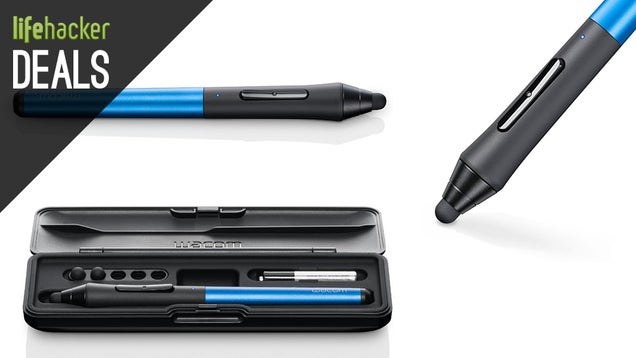
If you're in need of a serious stylus, The Wacom Intuos Creative iPad Stylus is sporting Bluetooth 4.0 and will play very nicely with your app of choice. Lowest price ever of $70 today. [Amazon]


A Smarter Stylus, Galaxy S5, The Latest JAMBOX, LTE Chromebooks

Samsung's new flagship Galaxy S5 just went on sale today, and Verizon users can grab it for $100 from Amazon. Based on the Gizmodo review, this is the new best Android phone for a lot of people, especially if you value battery life and picture quality, which you should. [Amazon]

Amazon is currently out of stock, but that won't last long, so lock in the deal price while you can.


A Smarter Stylus, Galaxy S5, The Latest JAMBOX, LTE ChromebooksS

The Jawbone JAMBOX line is your favorite series of bluetooth speakers, and today you can save big on the latest iteration, the MINI JAMBOX, which starts at just $106. By starts at, we mean the price varies by color, but fortunately the "graphite" is the most universally appealing and the cheapest. [Amazon]


A Smarter Stylus, Galaxy S5, The Latest JAMBOX, LTE Chromebooks

Today, Best Buy will sell you an HP 11" Chromebook LTE for just $250. This isn't our #1 Chromebook pick, but the Wi-Fi only model typically goes for $279, so this is a great deal. You will have to sign a Verizon contract to grab this, but if you're already a Verizon customer then you're good to go.

HP Chromebook 11 [Verizon LTE] | $249


A Smarter Stylus, Galaxy S5, The Latest JAMBOX, LTE Chromebooks

Anker 4-Port 36W USB Wall/Travel Charger | $20


A Smarter Stylus, Galaxy S5, The Latest JAMBOX, LTE Chromebooks

BodyGuardz 15% off site wide | Use code TAXBREAK


A Smarter Stylus, Galaxy S5, The Latest JAMBOX, LTE ChromebooksS

Speck and Incase Accessories are discounted today


A Smarter Stylus, Galaxy S5, The Latest JAMBOX, LTE ChromebooksS

Amazon Gold Box features flash storage ranging from 16GB to 2TB, and we're not talking external hard drives. See our coverage here.


Apps

Get 10% Off iTunes Gift Cards at Target

iOS

Android

Phones and Tablets

Computers

PC Parts

Storage

Power

Headphones

Home Theater

Home

Tools

Apparel

Photography

Entertainment

Books

Gaming


This post is brought to you by the Commerce Team, a dedicated group of deal hunters and product enthusiasts. We operate independently of Editorial to bring you the best bargains every day, share our favorite products with you, and ask you about yours. When you buy something we recommend, we may also get a small share of the sale. We welcome your questions and want your feedback.

RelatedRelated
Five Best Bluetooth Speakers

Speaker cables are so 1980, and if you're looking for an upgrade Bluetooth speakers are the logical next step. That said, the quality of… Read…

Related


View the Original article

Make Smarter Purchases with the "Stranger Test"

Make Smarter Purchases with the "Stranger Test"

Having trouble deciding whether you should blow money on that new gadget? Weblog Budgets Are Sexy has a simple test that might help.

When you are thinking of purchasing something, imagine a stranger holding the item you are thinking of buying in one hand, and the cash equivalent in the other. Which one would you take?"

You might find that you prefer to keep the cash for more important things later on. It doesn't apply in every situation, obviously, but it's a clever way to think about big purchases. Hit the link for some other interesting "tests" that can keep you from impulse purchases.

Two Kick-Ass Spending Tips | Budgets Are Sexy

Photo by TaxCredits.net.


View the Original article

Sabtu, 19 April 2014

Refresh Makes You Smarter At Meetings

Do you remember the party scene in “The Devil Wears Prada,” when Emily Blunt’s character is whispering the names of party guests to Meryl Streep’s character, briefing her on who everyone is as she meets them?

Refresh, a product that aims to keep you as prepared as possible for your next encounter, wants to be the app equivalent of that character. I’ve been using Refresh in the wild for about two months now. After a meeting with Redpoint’s Ryan Sarver, during which he raved about the product, I downloaded it out of curiosity and synced it with my Google and iOS calendar thinking nothing would come of it.

Something did come of it, however, as I ended up receiving its notifications often enough that I would actually click on them. I found that the more I looked at Refresh’s detailed “dossiers,” which pulled information from LinkedIn, Twitter, Facebook, CrunchBase, AngelList and various other sources beforehand, the more prepared I was for my meetings.

The more prepared I was for my meetings, the better those meetings went, and I ended up saving myself a lot of frantic pre-meeting Googling and stress, because Refresh had already pulled the data for me.

The best thing about Refresh was you could forget it existed, and it would remind you that you needed it 15 minutes before you needed it. I also ended up learning things I didn’t know about my co-workers and friends.

Refresh has a very refreshing backstory. Its founder, Bhavin Shah, was originally working at LeapFrog Enterprises, a startup that built tablets for kids. LeapFrog somehow happened to catch the attention of Howard Zucker, the then Deputy Assistant Secretary of Health, who wanted to use the technology to teach women in Afghanistan about prenatal safety.

Eventually, Shah ended up taking on the project and visited Afghanistan himself. In Kabul, he was impressed with the diplomatic brief books that the then U.S. Secretary of Health Tommy Thompson had at his disposal (“they were written in prose!”): “Someone should democratize the briefing book,” thought Shah at the time. “You say someone should do it, but you don’t think you should be the one to do it. And then you do it.”

CrunchBase

  • Refresh.io

    • Founded December 2011
    • Total Funding $10M
    • Overview Refresh seeks to eliminate small talk by providing users with detailed information about people they’re meeting with and suggesting topics of conversation. Refresh looks at your calendar of events and creates instant dossiers of people you’re planning to meet. The idea is to provide users with information that might be interesting or relevant to them as a way to build stronger connections between …
    • Website http://www.refresh.io
    • Full profile for Refresh.io

The app comes out of beta today, with a series of updates and prime real estate as Apple’s featured app. The core product —  a discreet file of the available data about people in your calendar when you need it in real time — is updated with easier onboarding, personalized email insights (aka who made the intro), contact cards, people search for over 40 million people and the ability to email a “dossier” to your inbox.

Refresh isn’t perfect and falls into a category easily dismissed as “a feature not a product,” because it’s hard to get right. Rapportive, which also aggregated contact-info data, fell to LinkedIn. Cue, an app that pulled data around your calendar beyond just contacts, sold to Apple in an acquisition of similar magnitude. Disrupt startup Trace, a cross between the two, vanished without a trace.

Shah will not tell me how many downloads, DAUs or MAUs the app has amassed since its beta launch in October. The app has raised over $10 million in funding from Redpoint and CRV and shares the space with apps like Triggerfox. Shah believes that Refresh’s competitive advantage is comprehensive data. “We don’t just do this for one or two sources, but for hundreds. Then we connect the relevant dots together to tell one story.”

Screen Shot 2014-04-10 at 3.30.09 PM

It’s easy to see how this kind of model can apply to insights beyond people, like if you’re invited to speak at a Leveraged Finance conference and have nary a clue what leveraged finance is. We are not super human, and forgetting a key detail — the difference between Gil Garcetti and Eric Garcetti, for example — in a meeting or an encounter could mean the difference between a deal won or lost.

“World leaders have learned centuries ago that productivity isn’t about a to-do list or getting everything done on time — it’s about connecting with people on a human level. I wanted this kind of tool and thought everyone should have it,” Shah says.

Providing the context around the pillars of daily life is a challenge, and Refresh isn’t the first app to want to be the Emily to your Miranda. But as someone who keeps pulling it out in meetings, because I love showing off cool apps, I keep finding Refresh useful. Even if just as a conversation starter.

refresh-screens

Rabu, 16 April 2014

How to Make Your iOS Notifications Smarter with IFTTT

How to Make Your iOS Notifications Smarter with IFTTT

iOS notifications are great for keeping you up to date with whatever's happening in your apps, but they get overwhelming quickly. With If This Then That, you can now refine those notifications so they're less intrusive, smarter, and more useful. Here's how.

Why It's Worth Refining Your Notification System

How to Make Your iOS Notifications Smarter with IFTTT

As we've pointed out plenty of times before, notifications are often a distraction that can really ruin your day. That said, you don't need to kill off all your notifications, you just need to make better use of them. IFTTT makes that a lot easier. With some tuning, you can set up notifications so you're notified of only specific circumstances that you truly care about—not everything from every app. What's nice about IFTTT is that you don't need to deal with notifications on an app-by-app basis. For example, you can turn off all notifications for Facebook, but still get updated on the very specific information you really care about.

We've seen similar solutions in both PushOver and PushBullet before, but the full-on IFTTT integration makes the whole process a lot easier.

IFTTT can fix a few of the big problems I have with notifications:

  • You need to install an app to get notifications: Sometimes I don't want to install and set up an app just to keep up to date on a small thing. For example, I don't need to install the ESPN app when all I want are scores for Avalanche games.
  • You have to have all notifications on for an app: A lot of apps give you one option for notifications and that's it. For example, a weather app might allow you to set up notifications for when it'll rain, but it sends them to you all the time. IFTTT lets you decide when and why you get those notifications on a more precise level. Likewise, you can fine-tune notifications for an app like Facebook so you only get a handful of the really important notices.
  • Apps don't offer notifications for what you want: Not all apps have every notification type, but IFTTT can create special notifications. For example, if you have just a handful of people you care about on social networks, you could set up notifications so that when they post to Instagram you're notified about it.

Essentially, IFTTT allows you to really fine tune and refine your notifications for a smarter system. This makes IFTTT your central hub for notifications so you don't have to mess around with other apps. Not only will it make your Notification Center less cluttered, it should help with battery life a bit too.

Set Up Notifications for IFTTT

How to Make Your iOS Notifications Smarter with IFTTT

Setting up notifications in IFTTT is super easy. You just need the IFTTT mobile app on your phone or iPad.

  1. Open up IFTTT and tap the recipe icon on the top-right
  2. Tap "Channels" and look for "iOS Notifications"
  3. Tap Activate and follow the steps

From there, it's all about setting up recipes that trigger your notifications. We've walked you through the process on both iOS and from the web before, so let's skip straight over to some of the better recipes that are already available. These aren't the end-all of recipes, but they should help you brainstorm some of your own.

Get Notifications for Only Specific Emails

How to Make Your iOS Notifications Smarter with IFTTTS

Email notifications are awesome, but you really don't need them for every single email you get. A recipe like this one for specific email addresses or this one for VIPs makes it so you only get notified of emails from people you actually care about.

Get a Weather Notification When You Wake Up

How to Make Your iOS Notifications Smarter with IFTTTS

Weather notifications are typically pretty unnecessary, but they're nice every once in a while. This recipe sends you a single notification with the upcoming days weather right when you wake up. If you'd prefer even fewer notifications, you can also set up notifications for the times you'll need a coat, when you need to put on sunscreen, pollen counts rise, or when it's going to rain.

Remind Yourself to Turn Wi-Fi On and Off When You Leave the House

How to Make Your iOS Notifications Smarter with IFTTTS

This recipe provides a helpful recurring reminder to turn your Wi-Fi off (or on) whenever you leave the house. If you're trying to save battery power, but still want to keep notifications and location services on, this is one way to do it.

Set a Recurring Reminder

How to Make Your iOS Notifications Smarter with IFTTTS

Pretty much every to-do app or calendar app has a place to enter in recurring reminders, but if you don't need all that bulk for a few simple things, IFTTT is great for things like reminders to pay rent or call your mom.

Get Sports Score Notifications for Just the Teams You Want

How to Make Your iOS Notifications Smarter with IFTTTS

If you're not a big enough sports fan that you need to see every single detail about every single game, then this recipe is great because it just tells you a team's score. It's an awesome way stay in the know about your local teams without taking up too much of your time.

Get Specific Notifications for Social Networks

How to Make Your iOS Notifications Smarter with IFTTTS

Pretty much every social network out there has a ton of different notifications it wants to send you. For most of us, that's too much, but IFTTT allows you to get a little more control over what you see. For example, this recipe notifies you when a specific user posts to Instagram, follower alerts on Twitter, you're tagged in a photo on Facebook, or when a specific group member posts something on Facebook.

Get Shipping Updates for Orders

How to Make Your iOS Notifications Smarter with IFTTTS

Unless you're shipping things all the time, you really don't need to install a specific app just to track shipments. This recipe just needs a tracking number and it'll send you updates as a package makes its way across the country.

RelatedRelated
Notifications Are Evil

What's your maximum NPH? How many notifications are you exposed to every hour? Let's take a second to think critically about these constant … Read…

Related


View the Original article