Diberdayakan oleh Blogger.
Tampilkan postingan dengan label Alarm. Tampilkan semua postingan

Kamis, 01 Mei 2014

AlarmPad phone’s capabilities in many ways

AlarmPad - Alarm Clock Free-1AlarmPad - Alarm Clock Free-2
(Please Note:
* Users of battery-saving apps such Greenify or Sony Stamina: you need to add AlarmPad in their list of exceptions for the alarms to work properly
* Interested in getting the app for free without ads plus trying out new features before everybody else? Please join our test community on Google+: https://plus.google.com/communities/113108980221311144145
* if you like the app please help us by leaving a review. Thank you.)
AlarmPad is an alarm clock that brings context to your alarms. Set one and see right away the weather forecast and your calendar appointments following its time. AlarmPad listens to your calendar updates and offers beautiful widgets that put in one place your next alarm, calendar appointment and weather forecast. It also allows you to listen to your personal messages and speak voice commands to dismiss or snooze the alarm.
AlarmPad is in beta. If you run into any problems, please write to us before leaving a review: alarmpad@mindmeapp.com. We will be happy to work with you to add new features or fix any issue you might have.
Main features
* Get information in context: Set the alarm and get weather forecast updates and your appointments following its time.
* Dismiss the alarm to a beautiful notification view: Get detailed weather and calendar information immediately after dismissing it. AlarmPad can also speak that information to you.
* Customize your alarm: Set your own personal message and let AlarmPad speak it in your language. It supports speaking the message while the alarm rings or after you dismiss it.
* Set an alarm for your calendar events: AlarmPad detects when you create a calendar event and asks if you want to create an alarm for it. Simple and easy.
* Use your bluetooth device: AlarmPad supports bluetooth so you can dismiss your alarms with a voice command while driving
* Use it with DashClock: AlarmPad comes with an extension to display information about your next alarm on DashClock.
* Integrate it into other apps: Automatically set alarms using other apps such as Tasker by simply choosing the “set an alarm” option.
* Use your MindMe Pro Key: If you already bought the MindMe Pro Key, there is no need to buy another. AlarmPad works with the one you already own.
* Available in English, German, Finnish, French, Hungarian, Italian, Portuguese, Romanian, Spanish, Swedish and Turkish
—————————-
About the free version
* You can only have 5 active alarms at a time on the free version. The alarm clock allows as many alarms as you want but you need to disable the active ones first when you reach the limit.
The free version is also ad-supported. Ads only have access to your Internet connection to display them and estimate your country/city location.
To remove these limits and ads, please consider buying the pro version or the MindMe pro key. With this pro key you also get access to our other app, MindMe Smart Notifications.
—————————
About the permissions
AlarmPad takes advantage of your phone’s capabilities in many ways. We are very careful with the permissions we request and make sure to only use them for the features we offer.
Size : 3.3M
Current Version : 1.3.2
Requires Android : 2.3 and up

Download

Don’t forget to leave your feedback under and observe us on Twitter or grow to be our Facebook fan for all the most recent updates!


Writted by: totor

Rabu, 16 April 2014

Puzzle Alarm Clock Wakes You Up with Puzzles, Flashing Lights, Evil

Puzzle Alarm Clock Wakes You Up with Puzzles, Flashing Lights, Evil

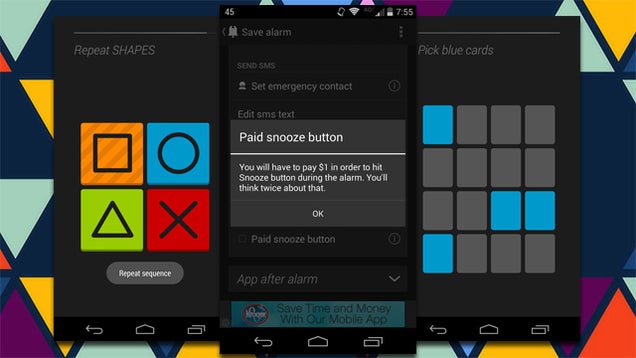
Android: Some of us need a kick in the pants to get out of bed. If you're looking to wake up to something pleasant, Puzzle Alarm Clock is all wrong for you. If you'd like to be awoken with puzzles, math, flashing lights, and a $1 charge every time you snooze, however, you're in the right place.

Despite the narrowly-defined name, this app is packed to the brim with a brutal features to get you out of bed. You have a selection of four different puzzles that you have to complete to turn off the alarm. On top of that, you can have the app send a notification asking if you're really awake (and if you don't answer, you get another alarm). And, if you would like the devil himself to wake you up, you can enable a setting that charges you $1 every time you use the snooze function.

The app is free and there are a host of other features worth exploring, including flashing LED lights while the alarm is going off, and an option to text someone in your contact list if you fail to wake up on time.

Puzzle Alarm Clock | Google Play Store via Addictive Tips


View the Original article

Sabtu, 12 April 2014

Nest Halts Sales Of Protect Smoke Alarm Over Safety Concerns About ‘Wave To Dismiss’ Feature

Nest CEO Tony Fadell has just issued a notice recommending users disable the Protect smoke alarm’s ’wave to dismiss’ feature. In testing, it was discovered that people could accidentally trigger the dismiss feature, delaying a smoke alarm.

Sales of the Nest Protect have also been halted.

He recommends that users disable the feature for now, and says Nest is going to update units that will allow the feature to work correctly. In addition, if your Nest Protect is connected to the Internet via Wi-Fi, it will have the feature disabled automatically.

Until the feature has been corrected, users can tap the button on the unit to silence alarms.

“At Nest, we conduct regular, rigorous tests to ensure that our products are the highest quality,” says Fadell. “During recent laboratory testing of the Nest Protect smoke alarm, we observed a unique combination of circumstances that caused us to question whether the Nest Wave (a feature that enables you to turn off your alarm with a wave of the hand) could be unintentionally activated.”

Fadell says that the testing will take two to three months, and that they will update consumers as they progress.

“We’re enormously sorry for the inconvenience caused by this issue,” he continues. “The team and I are dedicated to ensuring that we can stand behind each Nest product that comes into your home, and your 100% satisfaction and safety are what motivates us. Please know that the entire Nest team and I are focused on fixing this problem and continuing to improve our current products in every way possible.”

In a related FAQ, Nest says that it had observed the issue in testing and has had no reports of it from any customer. There are also instructions provided that will allow users to disable the feature even if the units are not connected to the net.

The post notes that if any consumers do not want to keep the Nest Protect, a complete refund will be offered. Somewhat ironically, the Nest Wave feature was promoted heavily as a benefit of owning a Protect unit.

On the plus side, because this is a device that has built-in software and connects to the net, it can be updated remotely to fix software-related issues. But recently, an issue with a Nest Thermostat software update caused problems with Wi-Fi and batteries in some units, highlighting the delicate nature of software that powers our environmental systems — and that we trust with our safety.

The Nest Protect was the company’s second product after the Nest Thermostat. Nest announced plans to be acquired by Google for $3.2 billion in cash in January.